Categoría: Normas APA

  • How to Write a Literature Review: Step-by-Step Guide with Examples (2026)

    A literature review is not a summary of everything you read. It is an organized, analytical synthesis of the existing scholarship on your topic — one that identifies patterns, debates, gaps, and trajectories in the research and positions your own work within that conversation. If your literature review reads like a series of disconnected summaries, it is not doing its job. This guide shows you exactly how to write a literature review that functions as real scholarship.

    What Is a Literature Review?

    A literature review is a critical survey of the published research on a specific topic. It appears in three contexts: as a standalone assignment (a review article or seminar paper), as part of a research paper’s introduction, or as a full chapter in a thesis or dissertation. In all three contexts, the purpose is the same: to show that you understand the existing scholarship, to identify what is known and what remains unresolved, and to situate your research within that landscape.

    The literature review answers the question: What do we already know about this topic, and why does your study need to exist? A good literature review makes the case that there is a genuine gap, debate, or unanswered question that your research addresses.

    Types of Literature Reviews

    Before you start, identify which type of literature review your assignment requires:

    • Narrative review — The most common type in humanities and social sciences. You select and synthesize relevant sources thematically, without a systematic, reproducible search process.
    • Systematic review — Used in medicine, public health, and evidence-based disciplines. Follows a strict, reproducible search protocol with explicit inclusion/exclusion criteria and a PRISMA flow diagram.
    • Scoping review — Maps the breadth of a topic rather than assessing quality. Used when the field is new or poorly defined.
    • Integrative review — Combines quantitative and qualitative studies to develop new conceptual frameworks.
    • Theoretical review — Surveys the theoretical frameworks that have been applied to a problem, rather than empirical findings.

    Most undergraduate and graduate course assignments require a narrative review. Dissertations in health, medicine, and policy fields often require systematic or scoping reviews. If your assignment doesn’t specify, confirm with your supervisor.

    How to Write a Literature Review: Step-by-Step

    Step 1: Define your scope

    Before searching for sources, define the boundaries of your review. What time period will you cover? Which disciplines? Which geographic contexts? Which types of studies (experimental, qualitative, theoretical)? A clear scope prevents you from drowning in tangentially related literature and keeps the review focused on what’s genuinely relevant to your research question.

    Step 2: Search systematically

    Use academic databases appropriate to your field: Google Scholar for broad coverage, PsycINFO for psychology, PubMed for medicine, JSTOR for humanities, Web of Science for STEM. Use Boolean operators (AND, OR, NOT) to refine your search. Keep a record of your search strings, databases, and dates — you may need to report this in a systematic review, and it helps you replicate the search if needed.

    Prioritize peer-reviewed journal articles and books from academic publishers. Check the reference lists of key papers to find sources you may have missed («forward and backward citation chaining»). Aim to use sources published within the last 10 years unless a foundational earlier work is essential to your argument.

    Step 3: Read critically, not passively

    Reading for a literature review is different from reading to understand a topic. You are reading to evaluate: What claim is this source making? What evidence supports it? What are the limitations? How does it relate to the other sources you’ve read? Does it agree or disagree, extend or contradict, refine or challenge earlier work?

    Take notes with a consistent structure: source, main argument, methods (if applicable), key findings, limitations, and how it connects to your research question. A synthesis matrix — a table with sources as rows and themes as columns — is an effective tool for spotting patterns across sources.

    Step 4: Identify themes, patterns, and gaps

    This is the step that transforms a summary into a literature review. Look across your sources for: themes that appear repeatedly, debates where scholars disagree, methodological trends or limitations across the field, contradictions in the evidence, and gaps — questions no one has answered, populations no one has studied, or methods no one has applied.

    These themes and gaps become the sections of your literature review. You are not organizing by source («Smith argues X, Jones argues Y, Brown argues Z»). You are organizing by idea («Research on X consistently finds that…, however, studies disagree about…»).

    Step 5: Choose an organizational structure

    There are three main ways to organize a literature review:

    • Thematic — Group sources by the themes, concepts, or issues they address. This is the most common structure for narrative reviews and the most effective for demonstrating synthesis. Each section covers a theme across multiple sources, rather than covering one source at a time.
    • Chronological — Trace how thinking on the topic has evolved over time. Useful when the historical development of a debate or theory is itself significant to your argument.
    • Methodological — Group sources by their research methods (quantitative vs. qualitative, experimental vs. observational). Useful in fields where methodological debates are central, or in the methods section of a dissertation literature review.

    Most literature reviews combine approaches: a broadly thematic structure with chronological ordering within each theme, or methodological grouping within a thematic framework.

    Step 6: Write the literature review

    A literature review has three parts: an introduction, a body organized by your chosen structure, and a conclusion.

    Introduction: State the topic and scope of the review. Explain the organizational approach and why you chose it. Preview the main themes or trajectory you will trace.

    Body: Each section covers one theme or aspect of the literature. Begin each section with a topic sentence that states the theme. Then synthesize multiple sources around that theme, showing how they relate to each other — who agrees, who disagrees, who built on whom. Do not summarize sources one by one. Compare, contrast, and connect them.

    Conclusion: Summarize the state of the field. Identify the key gap, debate, or limitation that your research addresses. This is where the literature review transitions to your research question or hypothesis: «Given these gaps in the existing research, the present study aims to…»

    Literature Review Example Paragraph

    Here is an example of a synthesized literature review paragraph (social sciences topic):

    Weak version (summary, not synthesis):
    Smith (2022) studied the relationship between social media use and self-esteem in adolescents. She found that heavy social media use was associated with lower self-esteem. Jones and Brown (2023) also studied this topic and found similar results. Davis (2024) conducted a longitudinal study and found that the effect was stronger among girls.

    Strong version (synthesis):
    Cross-sectional research consistently demonstrates a negative association between heavy social media use and self-esteem in adolescents (Smith, 2022; Jones & Brown, 2023), with effect sizes ranging from small to moderate (r = −0.18 to −0.34). Davis’s (2024) longitudinal work extends these findings by showing that the relationship is stronger and more durable among girls than boys, suggesting that platform-specific social comparison dynamics — particularly image-focused content — may drive the effect. However, the mechanisms underlying the gender difference remain poorly understood, as the existing studies did not measure specific platform usage or the nature of social comparison activity.

    The strong version synthesizes three sources into a single argument, quantifies the effect, identifies an emerging finding (gender difference), and ends by pointing toward a gap in the evidence. That gap motivates the next section or the research question.

    Common Literature Review Mistakes

    • Summarizing instead of synthesizing — A list of summaries is not a literature review. Synthesis means identifying how sources relate to each other, not just what each one says.
    • Organizing by source — Avoid the «Smith says X, Jones says Y, Brown says Z» structure. Organize by theme, not by author.
    • Including sources that aren’t relevant — Every source in the literature review should directly connect to your research question. Tangentially related sources inflate word count without strengthening the review.
    • Only including sources that agree with your position — A literature review must engage with contradictory evidence and dissenting views. Ignoring them weakens your credibility.
    • Failing to identify the gap — The literature review must show why your research is necessary. If you don’t identify a gap, your research has no justification.
    • Using too many direct quotes — Literature reviews should be primarily paraphrase and synthesis. Reserve direct quotes for particularly significant formulations that cannot be paraphrased without loss of meaning.

    Frequently Asked Questions

    How many sources should a literature review include?

    There is no universal minimum or maximum. A short (2,000-word) literature review section in a research paper might cite 15–25 sources. A dissertation literature review chapter might cite 50–150 sources depending on the field and scope. What matters is comprehensiveness within your defined scope — you should be able to demonstrate that you have surveyed the relevant scholarship, not that you have hit a number.

    How is a literature review different from an annotated bibliography?

    An annotated bibliography lists sources with a brief summary and evaluation of each one — it is organized by source. A literature review is written as continuous prose organized by themes, synthesizing sources into a coherent argument about the state of the field. An annotated bibliography is often a preparatory step toward writing the literature review.

    How recent do my sources need to be?

    As a general rule, prioritize sources published within the last 10 years for empirical claims, and within the last 5 years for rapidly evolving fields (technology, medicine, public health). Seminal or foundational works can be older if they are genuinely foundational to the field — citing a 1979 theory that is still the dominant framework is appropriate; citing a 1979 empirical study as if its findings are current is not.

    Can I use the same sources in my literature review and my reference list?

    Yes — every source cited in the literature review must appear in your reference list, and conversely, every source in your reference list should be cited somewhere in the paper. The literature review draws on the same pool of sources as the rest of the paper; it doesn’t have its own separate reference list.

    Related Resources

  • How to Write an Abstract: Examples for Every Paper Type (2026)

    The abstract is the most-read part of any academic paper — and often the most poorly written. Readers use the abstract to decide whether the full paper is worth their time. If your abstract is vague, disorganized, or simply a copy of your introduction, it fails at its only job. This guide shows you exactly how to write an abstract for any type of academic paper, with examples you can model directly.

    What Is an Abstract?

    An abstract is a concise, standalone summary of a research paper, thesis, dissertation, or article. It appears at the beginning of the paper — after the title page and before the introduction — and gives readers enough information to understand what the paper is about, why it matters, what was done, what was found, and what it means. In most academic formats (APA, Chicago, many journals), the abstract is a single paragraph of 150–250 words.

    The abstract is not an introduction. The introduction is the first section of your paper and leads the reader into your argument. The abstract is a separate, complete summary that stands alone — a reader should be able to understand the paper’s purpose and findings without reading anything else.

    What to Include in an Abstract

    Despite differences in length and format across disciplines, most academic abstracts answer five questions in order:

    1. Problem / background — What issue or gap does this paper address? One or two sentences of context.
    2. Purpose / objective — What is this paper trying to do? State your research question, aim, or hypothesis.
    3. Methods — How did you do it? Briefly describe your approach, data sources, or methodology.
    4. Results / findings — What did you find? This is the most important part — state your actual results, not just that you found them.
    5. Conclusion / implications — What does it mean? One sentence on the significance, implications, or applications of the findings.

    Not every abstract covers all five elements equally. Empirical research papers (psychology, biology, medicine) emphasize methods and results. Theoretical and humanities papers may spend more space on the argument and less on methods. Literature reviews emphasize scope and conclusions. Know which type of paper you’re writing and adjust accordingly.

    How to Write an Abstract: Step-by-Step

    Step 1: Write the abstract last

    You cannot write a good abstract before you have finished the paper. The abstract summarizes work that is complete. If you write it first, you will either be vague or you will write a plan rather than a summary. Wait until the paper is drafted, then write the abstract in a single session using the finished paper as your source.

    Step 2: Identify the one sentence for each element

    Go through your finished paper and write one sentence that answers each of the five questions: What problem? What purpose? What method? What result? What conclusion? These five sentences are your abstract’s skeleton. You now have something to edit rather than a blank page.

    Step 3: Expand to the required word count

    APA 7th edition recommends 150–250 words. Journals typically specify 150–300 words. Dissertations sometimes allow up to 350. Use additional sentences to add necessary detail to the elements that matter most for your paper type. Empirical papers need specific results («The intervention reduced anxiety scores by 23%, p = .002»). Theoretical papers need the main claim. Do not pad with background or context that is not essential.

    Step 4: Write in past tense for completed work

    The methods and results sections of an abstract are written in the past tense because the research is complete: «We collected data from 120 participants» and «The analysis revealed…» The introduction sentence (context) and conclusion (implications) may use the present tense: «This study addresses…» and «These findings suggest…»

    Step 5: Cut ruthlessly

    Every sentence in the abstract must earn its place. Remove background that the reader doesn’t need to understand the purpose. Remove methodological detail that doesn’t affect the interpretation of the results. Remove hedges and filler phrases («This paper attempts to…», «It is hoped that…»). What remains should be dense with information — every sentence should advance the reader’s understanding of the paper.

    Step 6: Check for common abstract errors

    Before finalizing, verify: no citations (abstracts do not cite sources), no abbreviations undefined in the abstract itself, no information not present in the paper, accurate reflection of what the paper actually concludes, and compliance with your journal’s or institution’s word limit.

    Abstract Examples by Paper Type

    Empirical Research Paper (Psychology / Social Science)

    Chronic stress is a known risk factor for cognitive decline, but the mechanisms through which occupational stress affects working memory in young adults remain poorly understood. This study investigated the relationship between self-reported occupational stress and working memory performance in full-time employees aged 22–35. Participants (N = 148) completed the Perceived Stress Scale and two validated working memory tasks (n-back and digit span). Results indicated a significant negative correlation between stress scores and both n-back accuracy (r = −0.43, p < .001) and digit span performance (r = −0.37, p = .002). The relationship remained significant after controlling for sleep quality and physical activity. These findings suggest that occupational stress impairs working memory performance in young adults independently of lifestyle factors, with implications for workplace wellness interventions targeting cognitive health.

    Word count: 148. Notice: Each of the five elements is present. The results section states specific numbers, not just «results were significant.» The conclusion identifies an implication, not just a plan for future research.

    Literature Review

    The relationship between sleep deprivation and academic performance in university students has received substantial research attention since 2010, yet the literature remains fragmented across disciplines and inconsistent in its findings regarding threshold effects. This review synthesizes 47 peer-reviewed studies published between 2010 and 2025, examining the effects of sleep duration and quality on GPA, exam performance, and cognitive test scores. The review identifies three consistent findings across the literature: sleep durations below 6 hours are associated with measurable academic performance decrements; the effect is stronger for objective cognitive measures than for self-reported GPA; and first-year students show greater vulnerability than upper-year students. However, significant heterogeneity in measurement instruments and population characteristics limits generalization. Future research should prioritize longitudinal designs with standardized sleep measurement to establish causal evidence for the relationship.

    Humanities / Argumentative Paper

    Scholarship on Toni Morrison’s Beloved has consistently interpreted the novel’s ghost as a figure of historical trauma and collective memory. This paper argues that this reading, while generative, has obscured an equally important dimension of the text: Morrison’s ghost functions not only as a memorial but as a critique of the limits of narrative itself as a vehicle for traumatic experience. Through close analysis of three narrative disruptions in the novel — the fragmented chronology, the shift to second-person address in Beloved’s monologue, and the deliberate gap in the Middle Passage passage — this paper demonstrates that Morrison uses these formal strategies to stage the failure of conventional storytelling to contain or transmit the experience of slavery. The argument challenges dominant trauma theory frameworks that position narrative as the primary means of healing and recovery.

    Scientific / Lab Report

    Antibiotic resistance in Escherichia coli represents a growing public health concern, with resistance rates to first-line antibiotics increasing annually in clinical settings. This study examined the minimum inhibitory concentrations (MICs) of three common antibiotics (ampicillin, tetracycline, and ciprofloxacin) against 24 E. coli isolates from local wastewater samples. Standard broth microdilution assays were performed in triplicate following CLSI guidelines. Results showed that 71% of isolates demonstrated resistance to ampicillin (MIC ≥ 32 μg/mL), 46% to tetracycline, and 17% to ciprofloxacin. Multi-drug resistance (resistance to two or more antibiotics) was observed in 42% of isolates. These findings indicate a high prevalence of antibiotic-resistant E. coli in wastewater, with implications for downstream contamination of water supplies and the need for enhanced monitoring protocols.

    Abstract Format Rules by Citation Style

    APA 7th Edition Abstract Format

    The abstract appears on page 2, after the title page. The heading «Abstract» is centered and bold. The text is a single paragraph, not indented. Word limit: 150–250 words. Below the abstract, add a keywords line: the word Keywords in italics, followed by a colon, then 3–5 lowercase keywords separated by commas. No citations in the abstract. No abbreviations unless defined within the abstract.

    Structured Abstracts (Medical / Clinical Research)

    Many medical journals and some social science journals require a structured abstract — one with explicit labeled sections rather than a single paragraph. Common section labels are: Objective, Methods, Results, Conclusions. Some journals use: Background, Aims, Methods, Results, Discussion. Always follow the specific journal’s author guidelines for structured abstract format. The content in each section is the same as described above; only the presentation changes.

    Dissertation Abstract

    Dissertation abstracts are longer than paper abstracts — typically 300–350 words, with some institutions allowing up to 500. The dissertation abstract must cover all five elements but in more detail, and often includes a brief statement of the dissertation’s contribution to the field. ProQuest (which archives most North American dissertations) limits the abstract to 350 words for the database entry.

    Common Abstract Mistakes

    • Announcing instead of summarizing — «This paper will examine…» is an announcement. «This study found…» is a summary. Write the abstract in the past tense, reporting what was done and found.
    • Omitting the results — The most common and damaging mistake. «The results supported the hypothesis» tells the reader nothing. State the actual finding: «Participants in the intervention group showed a 34% reduction in reported symptoms.»
    • Repeating the introduction — The abstract is not a longer version of your first paragraph. It covers the entire paper — including methods, results, and conclusions — in miniature.
    • Including citations — Abstracts do not cite sources. If you need to reference another study, paraphrase without attribution.
    • Exceeding the word limit — Word limits are strict. If your abstract is 280 words and the limit is 250, you must cut 30 words, not ask for an exception.
    • Writing it first — You cannot accurately summarize a paper you haven’t finished. Write the abstract last.

    Frequently Asked Questions

    How long should an abstract be?

    For most academic papers: 150–250 words in APA format. Journal articles vary — most are 150–300 words; always check the specific journal’s guidelines. Dissertations: 300–350 words typically, up to 500 for some institutions. Conference abstracts can be as short as 100–150 words. Structured abstracts in medical journals average 250–300 words across their labeled sections.

    Should an abstract be in first person or third person?

    This depends on the discipline. Social sciences and STEM fields following APA style now accept first person: «We recruited 120 participants» and «We found that…» Humanities papers often use third person or passive voice. When writing for a specific journal, follow its style guide. When writing for a course, follow your professor’s instructions or the citation style being used.

    Do all papers need an abstract?

    Not always. Short undergraduate essays typically don’t require abstracts. APA 7th edition student paper guidelines make abstracts optional unless specifically required by the instructor. Journal articles, theses, dissertations, and longer research papers almost always require one. Check your assignment instructions or the submission guidelines for your target journal.

    Can I use the same text in my abstract and my introduction?

    No. The abstract and introduction serve different functions and should not share text. The introduction is a full section that contextualizes the paper and leads into the argument. The abstract is a standalone summary of the entire paper. Some overlap in the problem statement sentence is acceptable, but copy-pasting is not. Many plagiarism detection tools also flag self-plagiarism within the same document if the same passage appears verbatim in two places.

    Related Resources

  • Turabian Format Template Word 2026 — Free Download (.docx)

    Turabian style is the student-focused adaptation of Chicago style. If your professor requires Turabian format, this page gives you a ready-to-use Turabian format template for Word — download it, replace the placeholder content, and submit. Because Turabian and Chicago use identical citation formats, this template works for both.

    Download Turabian Format Template for Word

    The template uses the Notes-Bibliography (NB) system — the version required in most humanities courses. It includes a title page, double-spaced body with five working footnotes, a sample data table, and a bibliography with nine formatted entries.

    Free download · Turabian 9th edition · Microsoft Word compatible · No registration needed

    Turabian vs. Chicago: What Is the Difference?

    Turabian style is based directly on The Chicago Manual of Style. The citation formats are identical — Notes-Bibliography footnotes and bibliography entries in Turabian follow exactly the same rules as Chicago. When your professor says «Chicago/Turabian» or simply «Turabian,» they mean the same citation system.

    The only practical differences are in document formatting for student papers: Turabian’s title page places the paper title roughly one-third down the page and groups the student’s name, course, instructor, institution, and date in the lower third. Turabian also includes specific guidance for theses and dissertations that Chicago’s professional-focused manual does not address in as much detail.

    Turabian Format Requirements

    Page Setup and Typography

    Turabian papers use US Letter paper (8.5 × 11 inches) with 1-inch margins on all sides. Some institutions require a left margin of 1.25 to 1.5 inches for bound theses — check your institution’s submission guidelines. Font is Times New Roman 12pt throughout. All text is double-spaced. The first line of each paragraph is indented 0.5 inches. Do not add extra spacing between paragraphs.

    Title Page

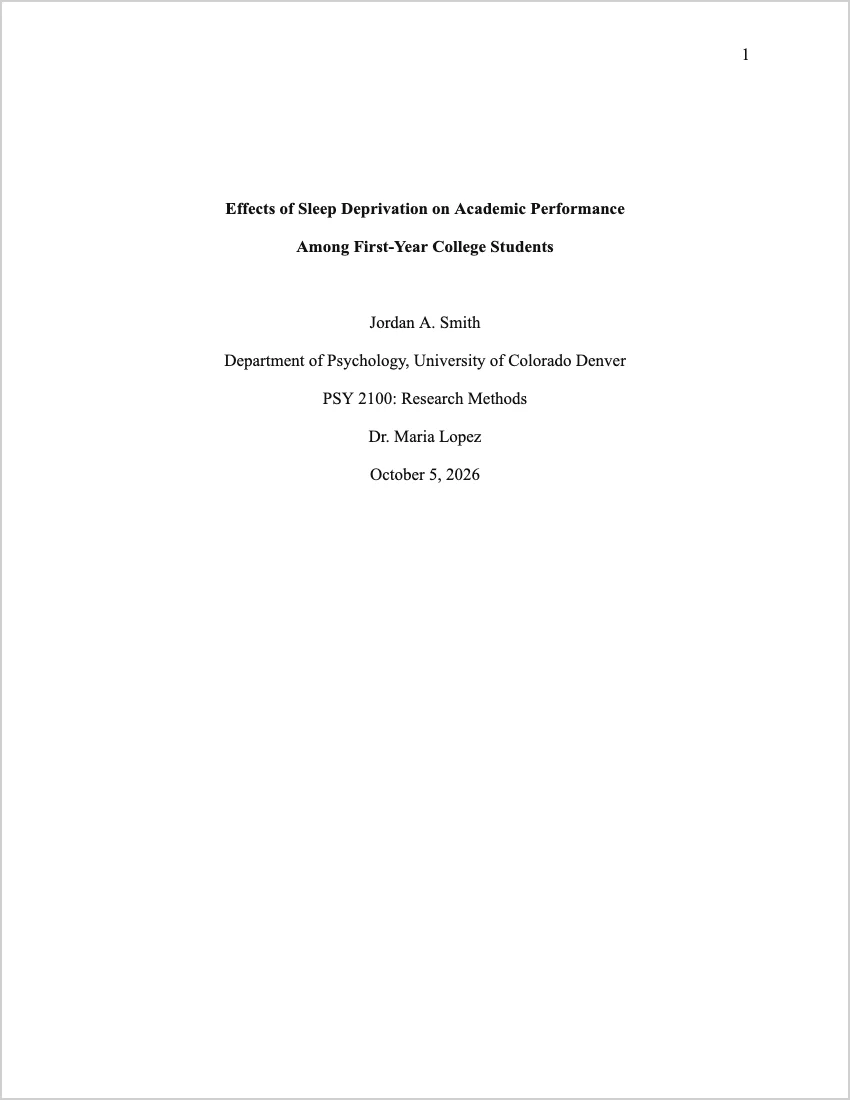
    The Turabian title page is not numbered. The paper title appears centered, roughly one-third of the way down the page. In the lower third, centered, include your name, the course name and number, your instructor’s name, your institution, and the date. The title page does not carry a page number. Body text begins on page 1.

    Page Numbers

    Page numbers appear in the top right corner of every page except the title page. In Word, set this as a right-aligned header with an automatic page number field. If your paper has a table of contents or other front matter, those pages typically use Roman numerals (i, ii, iii); Arabic numerals begin with the first page of text.

    Footnotes in Turabian

    Turabian NB system citations appear as numbered footnotes at the bottom of the page where the citation occurs. The first citation of each source gives the full details. All subsequent citations of the same source use the shortened form: Last Name, Shortened Title, page. Footnote text is single-spaced at 10pt, with a separator line above the footnote area.

    Bibliography

    The bibliography appears on a new page with the centered heading «Bibliography.» Entries are double-spaced, listed alphabetically by first author’s last name, with a hanging indent. Note that bibliography entries look different from footnote entries: the first author’s name is inverted (Last, First), and the punctuation between elements uses periods rather than commas.

    Turabian Citation Formats with Examples

    Book — First Footnote

    1. Jane Smith, Advanced Research Methodology (New York: Routledge, 2023), 45.

    Book — Subsequent Footnote (Short Form)

    3. Smith, Advanced Research, 78.

    Book — Bibliography Entry

    Smith, Jane. Advanced Research Methodology. New York: Routledge, 2023.

    Journal Article — First Footnote

    2. John Brown and Mary Davis, «Digital Scholarship in the Humanities,» Journal of Digital Humanities 12, no. 3 (2024): 112.

    Journal Article — Bibliography Entry

    Brown, John, and Mary Davis. «Digital Scholarship in the Humanities.» Journal of Digital Humanities 12, no. 3 (2024): 108–125.

    Chapter in Edited Volume — First Footnote

    4. Emily Clarke, «Methodology in Practice,» in Handbook of Academic Writing, ed. Robert Hall (Chicago: University of Chicago Press, 2022), 203.

    Website — First Footnote

    5. Susan Lee, «Primary Sources Online,» Humanities Digital Archive, January 15, 2026, https://www.example.edu/primary-sources.

    How to Use the Turabian Template: Step-by-Step

    1. Fill in the title page — Replace the paper title, your name, course, instructor, institution, and date.
    2. Write your text — Where you need a citation, place your cursor just before the period at the end of the sentence, then go to References → Insert Footnote in Word. A superscript number appears in the text and a matching footnote area opens at the bottom of the page.
    3. Type the full footnote — For the first citation of each source, use the full format shown above. For any subsequent citation of the same source, use the shortened form: Last Name, Short Title, page.
    4. Replace the sample table — In Turabian, tables have their number and title above the table (Table 1. Title) and source notes below.
    5. Build your bibliography — On the final page, list all cited sources alphabetically. Remember the formatting differences from footnotes: inverted first-author name, periods between elements instead of commas, no page number at the end of book entries.

    Common Turabian Format Mistakes

    • Confusing footnote and bibliography punctuation — Footnotes use commas between elements: Author, Title (Place: Publisher, Year), page. Bibliography entries use periods: Author. Title. Place: Publisher, Year.
    • Repeating the full footnote — After the first full citation, always use the short form for subsequent references to the same source.
    • Misusing ibid. — Ibid. is only correct when the immediately preceding footnote cites the exact same source and page. Many instructors now prefer the short form throughout — check your course guidelines.
    • Paginating the title page — The title page does not carry a page number.
    • Single-spacing the bibliography — The bibliography is double-spaced, same as the body text.

    Frequently Asked Questions

    Is Turabian the same as Chicago style?

    The citation formats are identical. Turabian is a student-focused adaptation of The Chicago Manual of Style, so footnote and bibliography entries follow exactly the same rules. If your professor says «Chicago/Turabian» or just «Turabian,» this template is appropriate.

    Which edition of Turabian should I use?

    The current edition is the 9th (2018), titled A Manual for Writers of Research Papers, Theses, and Dissertations. Most universities accept either the 8th or 9th edition — citation formats changed minimally between them. If your institution specifies an edition, follow that one.

    Does Turabian have an Author-Date system?

    Yes. Like Chicago, Turabian has both a Notes-Bibliography system (used in history, literature, and the arts) and an Author-Date system (used in some social sciences). The template uses Notes-Bibliography. If your course requires Author-Date, the parenthetical format is (Smith 2024, 45), and sources go in a reference list rather than a bibliography.

    Can I use this template for a thesis or dissertation?

    The template covers the core formatting requirements that apply to seminar papers and shorter theses. For a full dissertation, your institution will likely have additional formatting requirements — specific margin widths for binding, abstract pages, table of contents formatting, and more. Use this template as a starting point and supplement it with your institution’s specific dissertation guidelines.

    Related Resources

  • How to Cite in MLA Format: Complete Guide with Examples (2026)

    MLA format is the standard citation style for English literature, languages, film, and most humanities disciplines. If your professor requires MLA and you need to know exactly how to cite every type of source you might use, this guide gives you copy-ready examples for every format — from journal articles and books to websites, videos, and social media posts.

    All examples follow MLA 9th edition (2021), the current standard. Key differences from the 8th edition are noted where relevant.

    MLA Citation: Two Parts That Must Always Match

    Like all academic citation systems, MLA has two linked components:

    • In-text citation — a brief parenthetical reference in the body of your paper
    • Works Cited entry — a full citation on the Works Cited page at the end

    Every source cited in the text must appear in Works Cited. Every entry in Works Cited must be cited at least once in the text. Works Cited is not a bibliography of everything you read — only sources you actually used.

    MLA In-Text Citations: The Author-Page Format

    MLA uses the author-page format. The author’s last name and the page number appear in parentheses, with no comma between them. The citation goes before the closing punctuation of the sentence.

    One Author

    Parenthetical: (Smith 45)
    Author named in sentence: Smith argues that… (45).
    Direct quote: Smith argues that «the tension is unresolvable» (45).

    Two Authors

    (Smith and Jones 78)
    Smith and Jones argue that… (78).

    Three or More Authors

    Use the first author’s name followed by «et al.»:
    (Brown et al. 112)

    No Page Number (Websites, Some E-books)

    Omit the page reference entirely — use only the author name:
    (Johnson)
    If the source has numbered paragraphs, use «par.»: (Johnson, par. 4)
    If it has sections, use the section name: (Johnson, «Introduction»)

    No Author

    Use a shortened version of the title. Italicise book and website titles; put article titles in quotation marks:
    Book or website: (Merriam-Webster’s 45)
    Article: («MLA Format Guide» 3)

    Two Works by the Same Author

    Add a shortened title to distinguish them:
    (Smith, «Article Title» 45)
    (Smith, Book Title 112)

    Two Authors with the Same Last Name

    Add a first initial:
    (J. Smith 45) and (M. Smith 23)

    Entire Work (No Specific Page)

    Just the author name in parentheses, or name them in the sentence with no parenthetical:
    (Morrison)
    As Morrison demonstrates throughout Beloved

    Indirect Source (Quoting a Quote)

    If Smith quotes Jones and you want to use Jones’s words from Smith’s text:
    (qtd. in Smith 45)
    «Qtd. in» stands for «quoted in.» In Works Cited, include only Smith — the source you actually read.

    Direct Quotes in MLA

    Short quote (four lines or fewer): Enclose in quotation marks within the text. Citation goes before the closing punctuation.
    Clarke argues that «close reading remains the essential skill» (52).

    Long quote (more than four lines of prose, more than three lines of poetry): Use a block quotation. Indent the entire quotation one inch from the left margin. Do not use quotation marks. Place the citation after the final punctuation — the opposite of short quotes. Introduce with a complete sentence ending in a colon:

    Clarke summarises the problem as follows:

    The difficulty with digital archives is not access but interpretation. Scholars can now retrieve texts that were previously inaccessible, but the critical frameworks for reading those texts have not kept pace with the volume of newly available material. (Clarke 89)

    Poetry: Reproduce line breaks with a forward slash (/) for short quotes: «I heard a Fly buzz / when I died» (Dickinson 3-4). For longer poetry quotes, use a block quotation as above.

    MLA Works Cited: The Container System

    MLA 9th edition uses a flexible «container» system. Every source lives inside a container — a journal is the container for an article; a website is the container for a web page; an anthology is the container for a poem. Some sources have two containers (e.g., an article in a journal accessed through a database).

    The nine core elements, in order, are: Author. Title of Source. Title of Container, Other Contributors, Version, Number, Publisher, Publication Date, Location.

    Not every element applies to every source — omit elements that don’t exist for your source. Each element is followed by a comma except the last, which ends with a period.

    How to Cite a Journal Article in MLA

    Format: Last, First. «Title of Article.» Journal Name, vol. #, no. #, Year, pp. ##–##.

    One author:
    Clarke, Emily. «Close Reading in the Digital Age.» New Literary History, vol. 54, no. 1, 2023, pp. 34–58.

    Two authors:
    Smith, Karen, and Robert Park. «Rhetoric and Academic Prose.» College English, vol. 85, no. 3, 2023, pp. 201–218.

    Three or more authors:
    Brown, Tom, et al. «Contextual Factors in Academic Writing.» Journal of Writing Research, vol. 15, no. 2, 2024, pp. 89–115.

    Article accessed through a database (two containers):
    Clarke, Emily. «Close Reading in the Digital Age.» New Literary History, vol. 54, no. 1, 2023, pp. 34–58. JSTOR, https://www.jstor.org/stable/example.

    Article with DOI:
    Thompson, Rachel. «Citation Practices in Undergraduate Writing.» Pedagogy, vol. 23, no. 1, 2023, pp. 12–29. https://doi.org/10.1215/000000000.

    How to Cite a Book in MLA

    Format: Last, First. Title of Book. Publisher, Year.

    Single author:
    Johnson, Michael. The Art of Literary Analysis. Oxford UP, 2022.

    Two authors:
    Smith, Karen, and Michael Johnson. Writing in the Disciplines. 3rd ed., Pearson, 2023.

    Three or more authors:
    Brown, Tom, et al. The Handbook of Academic Writing. Routledge, 2022.

    Edited book:
    Hall, Robert, editor. New Approaches to Literary Theory. Cambridge UP, 2023.

    Chapter in an edited book:
    Clarke, Emily. «Digital Editions and Close Reading.» New Approaches to Literary Theory, edited by Robert Hall, Cambridge UP, 2023, pp. 45–67.

    Book with edition:
    Modern Language Association. MLA Handbook. 9th ed., Modern Language Association of America, 2021.

    Translation:
    Kafka, Franz. The Metamorphosis. Translated by Susan Bernofsky, W. W. Norton, 2014.

    Publisher abbreviations in MLA 9th edition: Abbreviate common publishers: «Oxford UP» not «Oxford University Press»; «U of Chicago P» not «University of Chicago Press.»

    How to Cite a Website in MLA

    Format: Last, First. «Title of Page.» Name of Site, Publisher or Sponsor, Day Month Year, URL.

    With author and date:
    Smith, Jane. «Understanding Unreliable Narrators.» Literary Hub, 15 Jan. 2024, lithub.com/example.

    Organisation as author:
    Modern Language Association. «MLA Style Introduction.» MLA Style Center, style.mla.org/example.

    No author:
    «Guide to Literary Analysis.» Purdue OWL, Purdue University, 10 Feb. 2024, owl.purdue.edu/example.

    No date:
    Smith, Jane. «Title of Page.» Site Name, url.com/example. Accessed 16 Mar. 2026.

    Note on access dates: Include an access date only when the source has no publication date or when the content may change over time. Format: Accessed Day Month Year.

    How to Cite a YouTube Video or Online Video in MLA

    Format: Last, First, or «Channel Name.» «Title of Video.» YouTube, Day Month Year, URL.

    Known creator:
    Smith, John. «How to Write a Literary Analysis.» YouTube, 20 Feb. 2024, youtube.com/watch?v=example.

    Channel name only:
    Literature Explained. «Shakespeare’s Tragedies: An Overview.» YouTube, 12 June 2024, youtube.com/watch?v=example.

    TED Talk (from TED website):
    Brown, Brené. «The Power of Vulnerability.» TED, June 2010, ted.com/talks/example.

    Film or documentary on streaming:
    The Social Dilemma. Directed by Jeff Orlowski, Exposure Labs, 2020. Netflix, netflix.com/title/81254224.

    How to Cite a Podcast in MLA

    Podcast episode:
    Host Name. «Episode Title.» Podcast Name, episode #, Production Company, Day Month Year, URL.

    Example:
    Raz, Guy. «The Science of Habit Formation.» How I Built This, episode 412, NPR, 15 Sept. 2023, npr.org/podcasts/example.

    How to Cite Social Media in MLA

    Tweet / X post:
    Last, First [@username]. «Full text of tweet if under 280 characters.» X, Day Month Year, URL.

    Smith, John [@johnsmith]. «New study confirms link between sleep quality and academic performance.» X, 5 Mar. 2024, x.com/johnsmith/status/example.

    Instagram post:
    American Psychological Association [@APAstyle]. «New citation guidelines now available on our website.» Instagram, 20 Jan. 2024, instagram.com/p/example.

    How to Cite a Film in MLA

    Feature film (cinema release):
    Inception. Directed by Christopher Nolan, Warner Bros. Pictures, 2010.

    Film — focusing on a specific person’s contribution:
    Nolan, Christopher, director. Inception. Warner Bros. Pictures, 2010.

    Film on streaming:
    Roma. Directed by Alfonso Cuarón, Participant Media, 2018. Netflix, netflix.com/title/80240715.

    How to Cite a TV Show in MLA

    Whole series:
    Breaking Bad. Created by Vince Gilligan, AMC, 2008–2013.

    Single episode:
    «Ozymandias.» Breaking Bad, directed by Rian Johnson, season 5, episode 14, AMC, 15 Sept. 2013.

    How to Cite a Poem in MLA

    Poem from an anthology:
    Dickinson, Emily. «Because I could not stop for Death.» The Norton Anthology of American Literature, edited by Robert S. Levine, 9th ed., Norton, 2017, pp. 1187–1188.

    Poem from a single-author collection:
    Hughes, Langston. «Harlem.» The Collected Poems of Langston Hughes, edited by Arnold Rampersad, Knopf, 1994, p. 426.

    In-text citation for poems: Use line numbers instead of page numbers, introduced by «line» or «lines» the first time:
    (Dickinson, lines 1–2)
    (Dickinson 5–6) — subsequent citations

    How to Cite a Newspaper Article in MLA

    Online newspaper:
    Brown, Tom. «Study Finds Exercise Improves Classroom Performance.» The New York Times, 10 Dec. 2024, nytimes.com/example.

    Print newspaper:
    Brown, Tom. «Study Finds Exercise Improves Classroom Performance.» The New York Times, 10 Dec. 2024, p. B4.

    How to Cite a Government Document or Report in MLA

    United States, Department of Education. The Condition of Education 2024. National Center for Education Statistics, 2024, nces.ed.gov/example.

    World Health Organization. Global Health Report 2024. WHO Press, 2024, who.int/example.

    How to Cite an Interview in MLA

    Published interview:
    Morrison, Toni. «The Art of Fiction No. 134.» Interview by Elissa Schappell. The Paris Review, no. 128, Fall 1993, pp. 83–125.

    Interview you conducted yourself:
    Smith, Jane. Personal interview. 10 Mar. 2026.

    MLA Works Cited: Formatting Rules

    • Starts on a new page with centered heading «Works Cited» (not bold, not underlined)
    • All entries double-spaced — no extra line between entries
    • Hanging indent: first line flush left, all subsequent lines indented 0.5 inches
    • Alphabetical by first element (usually author’s last name, or title if no author)
    • First author inverted (Last, First); all additional authors in normal order (First Last)
    • Two authors joined by «and»; three or more use the first author «et al.»
    • Titles: italicise containers (books, journals, websites, films); put source titles in quotation marks (articles, chapters, episodes)
    • Abbreviate months: Jan., Feb., Mar., Apr., May, June, July, Aug., Sept., Oct., Nov., Dec.
    • Abbreviate publishers when standard (Oxford UP, MIT P, U of Chicago P)

    Common MLA Citation Mistakes

    • Adding a comma between author and page number — MLA uses (Smith 45), not (Smith, 45). No comma.
    • Adding «p.» before the page number in in-text citations — Write (Smith 45), not (Smith p. 45). The «pp.» abbreviation is used only in Works Cited for page ranges.
    • Bolding or underlining the paper title — The title on the first page of an MLA paper is in plain title case — no formatting.
    • Using a title page — MLA does not use a separate title page. The four-line header appears at the top left of page 1.
    • Not inverting only the first author’s name — In Works Cited, only the first author is inverted (Last, First). Additional authors are normal order: Brown, Tom, and Jane Smith.
    • Forgetting the hanging indent in Works Cited — Every Works Cited entry must have a hanging indent.
    • Including sources not cited in the paper — Works Cited contains only sources you actually used. Everything else belongs in a separate «Works Consulted» list if needed.
    • Using «ibid.» — MLA does not use ibid. Repeat the author and page number every time.

    Frequently Asked Questions

    Do I need a page number in every MLA in-text citation?

    No — only when the source has page numbers. For websites, social media, and most online sources that don’t have stable page numbers, omit the page reference and use only the author name: (Smith). If the source has numbered paragraphs or sections, you can use «par. 4» or the section heading instead.

    How do I cite a website in MLA when there’s no author?

    Start the Works Cited entry with the title of the page in quotation marks. In the in-text citation, use a shortened version of the title: («MLA Format Guide») if no page number, or («MLA Format Guide» 3) if there is one. Never use the URL as the citation.

    What’s the difference between a Works Cited and a Works Consulted page in MLA?

    Works Cited lists only sources you cited in the paper. Works Consulted includes sources you read but didn’t cite. Most MLA papers require only a Works Cited. Check your assignment instructions — if in doubt, use Works Cited and include only sources that appear as in-text citations.

    How do I format a block quote in MLA?

    For quotations longer than four lines of prose or three lines of poetry: start on a new line, indent the entire quotation one inch from the left margin, do not use quotation marks, maintain double spacing, and place the citation after the final period. Introduce the block quotation with a complete sentence ending in a colon.

    Do I need an access date for websites in MLA?

    Only when the content has no publication date or is likely to change. For most stable web pages with clear publication dates, the access date is optional. Format: Accessed 16 Mar. 2026.

    How do I cite a source with no date in MLA?

    Simply omit the date from the Works Cited entry and add an access date at the end: Accessed 16 Mar. 2026. In the in-text citation, use the author name (or title if no author) as usual.

    What changed in MLA 9th edition vs. 8th edition?

    The 9th edition (2021) added a full chapter on inclusive language, explicitly endorsed the use of section headings in longer papers, clarified table formatting (label and title above the table), simplified URL formatting, and updated publisher abbreviations. The core container system and in-text citation format remained the same as the 8th edition.

    Related Resources

  • How to Cite in APA Format: Complete Guide with Examples (2026)

    APA format is the most widely required citation style in the social sciences, psychology, education, nursing, and business. Whether you’re writing your first undergraduate paper or finishing a graduate thesis, getting your citations right matters — both for academic integrity and for your grade. This guide covers every APA citation format you’ll actually need, with copy-ready examples for every source type.

    All examples follow APA 7th edition (2020), the current standard. If your institution or course materials reference the 6th edition, note the key differences at the end of this guide.

    APA Citation: Two Components You Always Need

    Every APA citation has two parts that must match each other:

    • In-text citation — appears in the body of your paper, immediately after the information you’re citing
    • Reference list entry — appears on the References page at the end of your paper, with full publication details

    Every source cited in the text must have a corresponding entry in the reference list. Every entry in the reference list must be cited at least once in the text. If a source appears in one place but not the other, the citation is incomplete.

    APA In-Text Citations: The Author-Date Format

    APA uses the author-date format for in-text citations. The author’s last name and the year of publication appear in parentheses. For direct quotes, add the page number.

    One Author

    Paraphrase: (Smith, 2024)
    Direct quote: (Smith, 2024, p. 45)
    Author named in sentence: Smith (2024) found that…

    Two Authors

    Always include both authors every time you cite the work. Use «&» inside parentheses; use «and» in the sentence.
    Parenthetical: (Smith & Jones, 2024)
    Narrative: Smith and Jones (2024) argued…

    Three or More Authors

    Use only the first author’s name followed by «et al.» — from the very first citation.
    Parenthetical: (Brown et al., 2023)
    Narrative: Brown et al. (2023) demonstrated…

    Group or Organisation as Author

    Spell out the full name on the first citation with the abbreviation in brackets. Use the abbreviation on subsequent citations.
    First citation: (World Health Organization [WHO], 2023)
    Subsequent: (WHO, 2023)
    If no abbreviation is commonly used, spell out the full name every time: (National Institute of Mental Health, 2024)

    No Author

    Use a shortened version of the title in place of the author. Italicise book and website titles; put article and chapter titles in quotation marks.
    Book or website: (Merriam-Webster’s Collegiate Dictionary, 2022)
    Article: («APA Style Overview,» 2024)

    No Date

    Use «n.d.» (no date) in place of the year.
    (Smith, n.d.)

    Multiple Citations in One Set of Parentheses

    List citations alphabetically by first author’s name, separated by semicolons.
    (Brown et al., 2023; Smith & Jones, 2024; Wilson, 2022)

    Two Works by the Same Author, Same Year

    Add lowercase letters after the year to distinguish them, matching the reference list entries.
    (Smith, 2024a)
    (Smith, 2024b)

    Secondary Source (Citing a Source You Found Inside Another Source)

    If you read Smith (2020) who cites Jones (2015), and you cannot access the Jones original:
    (Jones, 2015, as cited in Smith, 2020)
    In the reference list, include only Smith — the source you actually read.

    Personal Communications (Emails, Interviews, Conversations)

    Cite in the text only — do not include in the reference list, because the reader cannot retrieve them.
    (J. Smith, personal communication, March 10, 2026)

    Direct Quotes in APA

    When you reproduce the exact words of a source, enclose them in quotation marks and include the page number in the citation. If the source has no page numbers (like many websites), use paragraph numbers (para. 3) or section headings («Introduction» section, para. 2).

    Short quote (fewer than 40 words): Include in the text with quotation marks.
    Smith (2024) found that «the relationship between variables was stronger than expected» (p. 45).

    Long quote (40 words or more): Format as a block quotation. Start on a new line, indent the entire block 0.5 inches, do not use quotation marks. Place the citation after the final punctuation.
    Smith (2024) summarised the findings as follows:

    The results confirmed the hypothesis across all four conditions. Effect sizes were consistent with those reported in previous literature, suggesting that the intervention produces reliable outcomes regardless of participant age or baseline score. (p. 47)

    APA Reference List Format: The Basics

    The reference list starts on a new page at the end of the paper with the centred, bold heading References. All entries are double-spaced and use a hanging indent (first line flush left, subsequent lines indented 0.5 inches). Entries are listed alphabetically by first author’s last name.

    The general APA reference format is: Author, A. A. (Year). Title of work. Publisher. https://doi.org/xxxxx

    How to Cite a Journal Article in APA

    Format: Author, A. A., & Author, B. B. (Year). Title of article. Title of Journal, Volume(Issue), page–page. https://doi.org/xxxxx

    One author:
    Brown, T. (2023). Cognitive flexibility and academic resilience. Journal of Educational Psychology, 115(4), 812–829. https://doi.org/10.1037/edu0000000

    Two authors:
    Smith, K., & Jones, P. (2024). Longitudinal predictors of student motivation. Learning and Instruction, 89, 101–118. https://doi.org/10.1016/j.learninstruc.2024.000000

    Three to twenty authors (list all):
    Brown, T., Williams, K., & Patel, S. (2023). Effects of peer feedback on writing quality. Written Communication, 40(2), 201–228. https://doi.org/10.1177/0000000000000000

    Twenty-one or more authors (list first 19, then ellipsis, then last author):
    Garcia, A., Lee, B., Kim, C., Park, D., Wilson, E., Chen, F., … Zhang, Y. (2024). Global patterns in academic achievement. Comparative Education Review, 68(1), 1–45.

    Article with no DOI (available online):
    Thompson, R. (2023). Formative assessment practices in higher education. Teaching and Teacher Education, 128, 104–119. https://www.example.com/article

    Article with no DOI (print only):
    Wilson, D. (2022). Narrative identity in adolescent writing. Journal of Adolescent & Adult Literacy, 66(1), 23–31.

    How to Cite a Book in APA

    Format: Author, A. A. (Year). Title of book (edition). Publisher.

    Single author:
    Johnson, M. (2021). The psychology of learning. Sage Publications.

    Two authors:
    Clarke, E., & Hall, R. (2022). Research methods in the behavioral sciences (4th ed.). Sage Publications.

    Edited book:
    Martinez, C. (Ed.). (2023). Advances in cognitive science. Oxford University Press.

    Chapter in an edited book:
    Lee, S. (2023). Memory consolidation during sleep. In C. Martinez (Ed.), Advances in cognitive science (pp. 45–78). Oxford University Press.

    Book with edition:
    Smith, K., & Jones, P. (2024). Introduction to research design (3rd ed.). American Psychological Association.

    Book with DOI:
    Wilson, D. (2023). Writing history: A guide for students (5th ed.). Oxford University Press. https://doi.org/10.1093/0000000000

    Note on publisher location (APA 7th edition): Do not include the publisher’s city or state. APA 7th edition removed this requirement.

    How to Cite a Website in APA

    Format: Author, A. A. (Year, Month Day). Title of page. Site Name. URL

    With author and date:
    Smith, J. (2024, October 15). Understanding cognitive biases in decision-making. Psychology Today. https://www.psychologytoday.com/example

    With organisation as author:
    American Psychological Association. (2023, November 1). APA style guide for citations. https://apastyle.apa.org/example

    No author:
    Title of the web page. (Year, Month Day). Site Name. URL

    No date:
    Smith, J. (n.d.). Title of the web page. Site Name. https://www.example.com

    No author, no date:
    Title of the web page. (n.d.). Site Name. https://www.example.com

    Note: APA 7th edition does not require a «Retrieved from» statement before the URL unless the content is likely to change over time (like a wiki or institutional policy page, where you might add «Retrieved March 15, 2026, from»).

    How to Cite a YouTube Video or Online Video in APA

    Format: Author, A. A. [Screen name]. (Year, Month Day). Title of video [Video]. Platform. URL

    YouTube channel with real name:
    Smith, J. [JohnSmithPsych]. (2024, February 20). How cognitive load affects memory retention [Video]. YouTube. https://www.youtube.com/watch?v=example

    YouTube channel with only a screen name:
    Psychology Explained. (2024, June 12). The science of motivation [Video]. YouTube. https://www.youtube.com/watch?v=example

    TED Talk:
    Brown, B. (2010, June). The power of vulnerability [Video]. TED Conferences. https://www.ted.com/talks/example

    How to Cite a Podcast in APA

    Podcast episode:
    Host, A. A. (Host). (Year, Month Day). Episode title (No. episode number) [Audio podcast episode]. In Podcast Name. Production Company. URL

    Example:
    Raz, G. (Host). (2023, September 15). The science of habit formation (No. 412) [Audio podcast episode]. In How I Built This. NPR. https://www.npr.org/podcasts/example

    How to Cite Social Media in APA

    Twitter/X post:
    Author, A. A. [@username]. (Year, Month Day). First 20 words of the tweet [Tweet]. Platform. URL

    Smith, J. [@johnsmith]. (2024, March 5). New study confirms link between sleep quality and academic performance — see thread for [Tweet]. Twitter/X. https://x.com/example

    Instagram post:
    American Psychological Association [@APAstyle]. (2024, January 20). New citation guidelines now available on our website. Check the link in bio for [Photograph]. Instagram. https://www.instagram.com/p/example

    How to Cite a Report or Government Document in APA

    Government report:
    National Institute of Mental Health. (2023). Mental health statistics 2023 (NIMH Publication No. 23-MH-8088). U.S. Department of Health and Human Services. https://www.nimh.nih.gov/example

    Report from a private organisation:
    World Health Organization. (2024). Global health report 2024. https://www.who.int/example

    How to Cite a Dissertation or Thesis in APA

    Published (from ProQuest or institutional repository):
    Smith, J. (2023). The role of metacognition in academic self-regulation [Doctoral dissertation, University of Michigan]. ProQuest Dissertations and Theses. https://www.proquest.com/example

    Unpublished:
    Jones, P. (2024). Predictors of student retention in online learning environments [Unpublished doctoral dissertation]. Stanford University.

    How to Cite a Newspaper Article in APA

    Online newspaper article:
    Brown, T. (2024, December 10). Study finds exercise improves classroom performance. The New York Times. https://www.nytimes.com/example

    Print newspaper article:
    Brown, T. (2024, December 10). Study finds exercise improves classroom performance. The New York Times, B4.

    How to Cite a Film or TV Show in APA

    Film:
    Nolan, C. (Director). (2010). Inception [Film]. Warner Bros. Pictures.

    TV series (whole series):
    Gilligan, V. (Executive Producer). (2008–2013). Breaking Bad [TV series]. AMC.

    Single episode:
    Johnson, A. (Director). (2023, November 5). The reunion (Season 4, Episode 8) [TV series episode]. In V. Gilligan (Executive Producer), Example Series. Production Company.

    APA Reference List: Formatting Rules Checklist

    • Starts on a new page, heading «References» centred and bold
    • All entries double-spaced — no extra blank line between entries
    • Hanging indent: first line flush left, all subsequent lines indented 0.5 inches
    • Alphabetical by first author’s last name
    • Multiple works by same author: order by year, earliest first
    • Multiple works by same author in same year: add a, b, c after the year
    • DOIs formatted as hyperlinks: https://doi.org/xxxxx
    • No publisher city required (APA 7th edition)
    • Only the first word of article titles and book titles capitalised (and proper nouns) — journal names use title case
    • Journal names and book titles in italics; article and chapter titles in plain text

    APA 7th Edition vs. 6th Edition: Key Differences

    If your course materials reference the 6th edition, here are the most important citation-related changes in the 7th edition:

    • Three or more authors → et al. from the first citation. In the 6th edition, you listed up to five authors before using et al.; in the 7th edition, use et al. for any work with three or more authors from the very first citation.
    • Up to 20 authors in the reference list. In the 6th edition, you listed the first six authors and then et al. Now you list all authors up to 20.
    • DOI format changed. The 6th edition used «doi:» followed by the number. The 7th edition uses the full hyperlink format: https://doi.org/xxxxx.
    • Publisher location removed from book references. The 7th edition no longer requires city and state for book publishers.
    • Running head removed for student papers. Student papers no longer need a running head — only professional papers do.
    • «Retrieved from» mostly removed. Unless content is likely to change, you no longer write «Retrieved from» before a URL.

    Common APA Citation Mistakes to Avoid

    • Using «&» in the sentence text — «&» goes inside parentheses only: (Smith & Jones, 2024). In narrative citations, write «and»: Smith and Jones (2024).
    • Missing page number in direct quotes — Every direct quotation requires a page number or location indicator.
    • Not matching in-text citations to reference list — Every citation must appear in both places, with identical author names and years.
    • Capitalising article and book titles in the reference list — Only the first word and proper nouns are capitalised in titles of articles and books. Journal names use title case.
    • Using the author’s first name — APA uses initials only in the reference list: Brown, T., not Brown, Tom.
    • Listing sources that were not cited — The reference list is not a bibliography of everything you read. Only sources you cited go in the list.
    • Using «pp.» for journal page numbers — «pp.» (with double p) is used for book chapters; use just page numbers for journal articles: 45–67, not pp. 45–67.

    Frequently Asked Questions

    Do I need a page number for paraphrases in APA?

    APA 7th edition does not require page numbers for paraphrases — only for direct quotations. However, the Publication Manual encourages you to include page numbers for paraphrases too, especially when the source is long and the specific location would help the reader. Many professors require page numbers for all citations, so check your course guidelines.

    How do I cite a source with no date?

    Use «n.d.» (no date) in place of the year in both the in-text citation and the reference list entry: (Smith, n.d.) and Smith, J. (n.d.). This is common for undated web pages and some institutional documents.

    How do I cite a source with no author?

    Move the title to the author position in the reference list. In the in-text citation, use a shortened version of the title in italics (for books and websites) or in quotation marks (for articles and chapters). Never use «Anonymous» unless the work explicitly credits «Anonymous» as the author.

    Can I cite the same source multiple times?

    Yes — cite the source every time you use information from it. Do not assume the reader remembers a source you cited three paragraphs earlier. APA does not use «ibid.» Each citation is repeated in full (author, year) every time it appears.

    How do I cite a source found through Google Scholar?

    Cite the original source — the journal article, book, or report — not Google Scholar itself. Use the full citation format for whatever type of source it is. If you accessed the full text through a database, use the database URL or DOI. If you read the Google Scholar preview only, go find and read the actual source.

    How do I cite ChatGPT or an AI tool in APA?

    APA guidance for citing generative AI (updated 2023): treat the AI as the author, with the company as a group author. For ChatGPT: OpenAI. (2024). ChatGPT (March 2024 version) [Large language model]. https://chat.openai.com. In-text: (OpenAI, 2024). Include the specific version if known. Always check whether your institution permits AI use and follow any additional attribution guidelines they require.

    Related Resources

  • MLA Format Template Word 2026 — Free Download (.docx)

    MLA format is the standard citation style for English literature, language studies, comparative literature, film, and most humanities courses. If your professor requires MLA 9th edition and you need a properly formatted paper to start from, this page gives you a ready-to-use MLA format template for Word — download it, fill in your content, and submit.

    Download MLA Format Template for Word

    The template follows MLA 9th edition (2021) requirements. It includes the four-line header, centered title, double-spaced body with in-text citation examples, an optional section headings example, a comparison table, and a complete Works Cited page with ten formatted entries.

    Free download · MLA 9th edition · Microsoft Word compatible · No registration needed

    What’s Included in the MLA Template

    • Four-line header — Student name, professor name, course name, and date — correctly positioned top left, no separate title page
    • Centered title — In title case, no bold, no underline, no quotation marks
    • Double-spaced body — Times New Roman 12pt, 1-inch margins, 0.5-inch first-line indent on every paragraph
    • In-text citation examples — Author-page format (Smith 45), two authors, three or more (et al.), no page number, same-author disambiguation
    • Optional section headings — Bold, flush left, title case — acceptable in longer MLA papers
    • Sample table — MLA-style table with label and title above
    • Works Cited page — Ten fully formatted entries: journal articles, books, edited volumes, a website, and a literary primary source

    MLA Format Requirements: The Complete Guide

    MLA format looks simpler than APA at first glance — no title page, no abstract, no running head — but its citation system has specific rules that differ meaningfully from other styles. This guide covers everything you need to format an MLA paper correctly.

    Page Setup

    MLA papers use standard US Letter paper (8.5 × 11 inches) with 1-inch margins on all sides. The font is Times New Roman 12pt. All text is double-spaced throughout the paper — the header, title, body, block quotations, and Works Cited. The first line of every paragraph is indented 0.5 inches. Do not add extra space between paragraphs.

    Header and Title (No Title Page)

    MLA student papers do not use a separate title page. Instead, a four-line block appears at the top left of the first page, double-spaced like the rest of the paper:

    • Line 1: Your full name
    • Line 2: Your professor’s name
    • Line 3: The course name and number
    • Line 4: The date (Day Month Year format: 14 March 2026)

    After the four-line block, the title appears centered on the next double-spaced line. The title uses title case but is not bold, underlined, or in quotation marks — unless it contains a title that would normally be italicized or in quotation marks (e.g., An Analysis of Beloved).

    Page Numbers

    MLA page numbers appear in the top right header with your last name before them: Smith 1, Smith 2, etc. In Word, set this as a right-aligned header with your last name, a space, and then an automatic page number field. Page numbers begin on the first page of text.

    In-Text Citations: Author-Page Format

    MLA in-text citations use the author’s last name and the page number, with no comma between them, enclosed in parentheses. The citation goes before the closing punctuation of the sentence.

    • One author, paraphrase: (Smith 45)
    • One author, direct quote: (Smith 45) — same format
    • Two authors: (Smith and Jones 78)
    • Three or more authors: (Brown et al. 112)
    • No page number (website, etc.): (Johnson) — omit page reference
    • Author named in sentence: Smith argues that «[quote]» (45). — only the page number in parentheses
    • Two works by same author: (Smith, «Article Title» 45) or (Smith, Book Title 112)
    • Two authors with same last name: (J. Smith 45) and (M. Smith 23)
    • No author: Use a shortened version of the title: («Article Title» 45) or (Book Title 112)
    • Entire work (no specific page): (Morrison) — just the author name

    Block Quotations

    When a quotation is longer than four lines of prose (or more than three lines of poetry), use a block quotation. Indent the entire quotation one inch from the left margin — do not use quotation marks. The citation goes after the final punctuation, not before it (the opposite of regular quotes). Introduce the block quotation with a complete sentence and a colon.

    MLA Works Cited Format for Every Source Type

    The Works Cited page begins on a new page after the body of the paper. The heading «Works Cited» is centered and not bold. Entries are listed alphabetically by the first element (usually author’s last name) and use a hanging indent — first line flush left, subsequent lines indented 0.5 inches. The entire page is double-spaced.

    MLA 9th edition uses a universal «container» format for all source types, which makes the system more flexible than previous editions. The core elements, in order, are: Author. Title of Source. Title of Container, Other contributors, Version, Number, Publisher, Publication date, Location.

    Journal Article

    Last, First. «Title of Article.» Journal Name, vol. #, no. #, Year, pp. ##–##.

    Example: Clarke, Emily. «Close Reading in the Digital Age.» New Literary History, vol. 54, no. 1, 2023, pp. 34–58.

    Book

    Last, First. Title of Book. Publisher, Year.

    Example: Johnson, Michael. The Art of Literary Analysis. Oxford UP, 2022.

    Book Chapter (Edited Collection)

    Last, First. «Title of Chapter.» Title of Book, edited by First Last, Publisher, Year, pp. ##–##.

    Website

    Last, First. «Title of Page.» Name of Site, Publisher or Sponsor, Day Month Year, URL.

    Note: MLA 9th edition recommends including the access date for websites only when the content is likely to change or has no publication date: Accessed 14 Mar. 2026.

    Article in an Online Database

    Last, First. «Title of Article.» Journal Name, vol. #, no. #, Year, pp. ##–##. Database Name, DOI or URL.

    Film or Video

    Title of Film. Directed by First Last, Production Company, Year.

    Poem from an Anthology

    Last, First. «Title of Poem.» Title of Anthology, edited by First Last, Publisher, Year, pp. ##–##.

    MLA 9th Edition: Key Changes from the 8th Edition

    MLA 9th edition (2021) introduced several changes from the 8th edition (2016). If you have older course materials, here are the most important updates:

    • Inclusive language guidance added — The 9th edition added a chapter on inclusive language, including guidance on avoiding bias in writing.
    • Section headings now endorsed — The 9th edition explicitly endorses using headings in longer papers, which was ambiguous in the 8th edition.
    • Formatting for tables clarified — Tables are labeled «Table» followed by an Arabic numeral, with the label and title above the table.
    • URL formatting simplified — URLs no longer need to be broken at punctuation marks at line breaks; let the word processor wrap naturally.
    • Abbreviations updated — Some publisher abbreviations changed (e.g., «U» for University in publisher names: «Oxford UP» not «Oxford University Press»).
    • Author format clarified for two+ names — The first author is inverted (Last, First), but additional authors are listed normally (First Last) separated by «and.»

    How to Use the MLA Template: Step-by-Step

    1. Fill in the four-line header — Replace the placeholder lines with your name, your professor’s name, the course name, and the date (Day Month Year format).
    2. Replace the centered title — Use title case. Do not bold, underline, or add quotation marks unless the title contains an italicized work title.
    3. Update the page header — In Word: Insert → Header → Edit Header → type your last name, a space, then Insert → Page Number → Top of Page → Plain Number 3 (right-aligned).
    4. Write your introduction — The template has working citation examples. Follow the same pattern: (Author Page) for all in-text citations.
    5. Use section headings if needed — For longer papers, bold flush-left headings in title case are acceptable. Remove them for shorter essays where they’re unnecessary.
    6. Replace the sample table — Rename Table 1 and update the data. Keep the label and title above the table.
    7. Build your Works Cited — Replace the ten example entries with your actual sources. Keep the hanging indent and alphabetical order.

    Common MLA Format Mistakes

    • Using a title page — MLA student papers use a four-line header, not a separate title page. Adding a title page is incorrect unless your professor specifically requests one.
    • Putting a comma in the citation — MLA uses (Smith 45), not (Smith, 45). No comma between author and page number.
    • Adding «p.» before the page number — MLA in-text citations omit the abbreviation: (Smith 45), not (Smith p. 45). Only the Works Cited uses «pp.» for page ranges.
    • Bolding or underlining the title — The paper title on the first page should be in plain title case — no bold, no underline, no quotation marks.
    • Not including page numbers in the header — Every MLA paper needs a last-name-page-number header (Smith 1) on every page, including the first.
    • Calling the bibliography «Works Cited» but including unread sources — Works Cited includes only sources you actually cited in the paper. If you want to include additional sources, use a separate «Works Consulted» list.
    • Forgetting the hanging indent in Works Cited — Every Works Cited entry uses a hanging indent: first line flush left, subsequent lines indented 0.5 inches. This is the opposite of a standard paragraph indent.
    • Using «Ibid.» or footnotes for citations — MLA does not use ibid. Every citation repeats the author and page, every time. Footnotes in MLA are used only for supplementary commentary, not for citations.

    MLA vs. APA vs. Chicago: When to Use Each

    The choice of citation style depends on your discipline and often on your professor’s explicit instructions. MLA is standard in English literature, literary criticism, languages, and most humanities courses at the undergraduate level. APA is required in psychology, education, nursing, and the social sciences. Chicago is required in history, philosophy, and some interdisciplinary humanities programs.

    The most visible differences between MLA and the other formats: MLA has no title page and no abstract; APA and Chicago both use title pages. MLA uses author-page citations (Smith 45); APA uses author-date (Smith, 2024); Chicago uses footnotes. MLA calls its bibliography «Works Cited»; APA calls it «References»; Chicago calls it «Bibliography.»

    Frequently Asked Questions

    Does MLA 9th edition require a title page?

    No. Standard MLA student papers use a four-line header at the top left of the first page (your name, professor’s name, course, date), not a separate title page. Some professors or institutions do request a title page — if yours does, follow their specific instructions. The template uses the standard MLA header format.

    How do I cite a website in MLA when there’s no author?

    When a website has no identified author, begin the Works Cited entry with the title of the page in quotation marks. In the in-text citation, use a shortened version of the title in quotation marks: («MLA Format» 3) if there are page numbers, or («MLA Format») if there are none. Never use the website’s URL as the citation.

    What is the difference between Works Cited and a Bibliography in MLA?

    Works Cited includes only the sources you actually cited in your paper — every source in the text must appear in Works Cited, and every entry in Works Cited must be cited in the text. A bibliography (or «Works Consulted») includes sources you read but did not necessarily cite. Most MLA papers require a Works Cited, not a full bibliography. Check your assignment instructions to confirm which is expected.

    Do I need to include the access date for websites in MLA?

    MLA 9th edition recommends including an access date («Accessed 14 Mar. 2026») only when the content is likely to change over time or when no publication date is available. For stable websites with a clear publication date, the access date is optional. When in doubt, include it — it adds information without hurting the citation.

    Can I use headings in an MLA paper?

    Yes. MLA 9th edition endorses section headings for longer papers where they help the reader navigate the content. Headings should be in bold, flush left, and in title case. MLA does not specify multiple heading levels the way APA does — use a simple, consistent system that reflects the structure of your paper. For short essays of five pages or fewer, headings are usually unnecessary.

    How do I format a long quotation in MLA?

    Quotations of more than four lines of prose (or more than three lines of poetry) should be formatted as block quotations. Start on a new line, indent the entire quotation one inch from the left margin, maintain double spacing, and do not use quotation marks. Place the parenthetical citation after the final punctuation — the opposite of regular in-text citations. Introduce the block quotation with a sentence that ends in a colon.

    Related Resources

  • APA Format Template Word — Free Download (.docx)

    APA format is the most widely required citation style in psychology, education, nursing, business, and the social sciences. If your professor requires APA 7th edition and you need a properly formatted paper to start from, this page gives you a ready-to-use APA format template for Word — download it, replace the placeholder content, and submit.

    Download APA Format Template for Word

    The template follows APA 7th edition (2020) requirements throughout. It includes a title page, abstract with keywords, double-spaced body with in-text citation examples, a sample results table with a note, and a complete reference list with nine entries.

    Free download · APA 7th edition · Microsoft Word compatible · No registration needed

    What’s Included in the APA Template

    • Title page — Paper title, author name, institutional affiliation, course name and number, instructor name, and due date — all correctly formatted per APA 7th edition student paper guidelines
    • Abstract — Single unindented paragraph with keywords line below
    • Body sections — Introduction (using the paper title as the heading), Method with three subsections (Participants, Materials, Procedure), Results, Discussion, and Conclusion
    • In-text citation examples — One author, two authors, three or more authors (et al.), direct quotes with page numbers, and multiple citations in one set of parentheses
    • Sample table — Table 1 in APA format with table number, title, body, and note below
    • Reference list — Nine entries: journal articles, books, edited books, and a DOI-formatted source — all in APA 7th edition style

    APA Format Requirements: The Complete Guide

    APA 7th edition introduced several changes from the 6th edition (2010). If your course materials or institution references an older version, check with your professor. The template follows 7th edition standards throughout.

    Page Setup

    APA papers use US Letter paper (8.5 × 11 inches) with 1-inch margins on all sides. Body text is set in 12pt Times New Roman (or 11pt Calibri or 11pt Arial — all are acceptable in APA 7th edition). All text is double-spaced, including the reference list. There are no extra spaces between paragraphs. The first line of every paragraph is indented 0.5 inches, with two exceptions: the abstract and block quotations are not indented.

    Title Page: Student vs. Professional Paper

    APA 7th edition distinguishes between student papers and professional papers. The template uses the student format, which is what most course assignments require. The student title page includes: paper title (bold, centered), author name, institutional affiliation (department and university), course number and name, instructor name, and assignment due date. Professional papers additionally include an author note and a running head — if your professor asks for a running head, add it as a header in Word with the paper title in all caps.

    The Abstract

    The abstract appears on its own page after the title page. It is a single paragraph of 150–250 words, written without indentation. The heading «Abstract» is centered and bold. Below the abstract, include a keywords line: the word Keywords in italics, followed by a colon, then three to five keywords in lowercase (unless a proper noun) separated by commas. The abstract page is page 2; the first body page begins on page 3.

    Body Headings: APA’s Five Levels

    APA uses five levels of heading. Most student papers use only two or three.

    • Level 1 — Centered, bold, title case. Used for major sections: Introduction (presented as the paper title), Method, Results, Discussion, References.
    • Level 2 — Left-aligned, bold, italic, title case. Used for subsections within Method (Participants, Materials, Procedure) and Discussion.
    • Level 3 — Left-aligned, bold, italic, title case, ending with a period. The paragraph text begins on the same line.
    • Level 4 — Indented, bold, title case, ending with a period. Paragraph text begins on the same line.
    • Level 5 — Indented, bold, italic, title case, ending with a period. Paragraph text begins on the same line.

    In-Text Citations

    APA citations appear in parentheses within the text. The basic formats:

    • One author: (Smith, 2024) or Smith (2024) found that…
    • Two authors: (Smith & Jones, 2024) — use «&» inside parentheses, «and» in a sentence
    • Three or more authors: (Brown et al., 2023) — use et al. from the first citation
    • Direct quote: (Smith, 2024, p. 45) — always include the page number
    • Multiple citations: (Brown et al., 2023; Smith & Jones, 2024) — alphabetical order, semicolons
    • Organisation: (American Psychological Association [APA], 2020) first citation; (APA, 2020) thereafter
    • No date: (Smith, n.d.)

    APA Reference List Format

    The reference list starts on a new page after the body. The heading «References» is centered and bold. Entries are double-spaced with a hanging indent (first line flush left, subsequent lines indented 0.5 inches). List all references alphabetically by first author’s last name.

    APA Reference Format for Every Source Type

    Journal Article

    Author, A. A., & Author, B. B. (Year). Title of article. Title of Journal, Volume(Issue), page–page. https://doi.org/xxxxx

    Example: Brown, T., Williams, K., & Patel, S. (2023). Longitudinal effects of intervention on academic outcomes. Journal of Educational Psychology, 115(4), 812–829. https://doi.org/10.1037/edu0000000

    Book

    Author, A. A. (Year). Title of book (edition). Publisher.

    Example: Clarke, E., & Hall, R. (2022). Research methods in the behavioral sciences (4th ed.). Sage Publications.

    Book Chapter (Edited Volume)

    Author, A. A. (Year). Title of chapter. In E. Editor & F. Editor (Eds.), Title of book (pp. xx–xx). Publisher.

    Website

    Author, A. A. (Year, Month Day). Title of page. Site Name. URL

    Note: In APA 7th edition, DOIs are formatted as hyperlinks (https://doi.org/xxxxx). URLs are also included without «Retrieved from» unless the content is likely to change over time.

    Report or Government Document

    Author, A. A. (Year). Title of report (Report No. xxx). Publisher. URL

    APA Tables and Figures

    Tables

    In APA 7th edition, table formatting follows specific rules. The table number (Table 1) appears above the table in bold, on its own line. The table title appears on the next line in italic title case, not bold. The table body follows. Below the table, a note (introduced by Note. in italic) explains abbreviations, provides additional context, or credits the source.

    APA 7th edition changed table formatting from 6th edition: horizontal lines are used sparingly (above the header row, below the header row, and at the bottom of the table), and vertical lines are not used at all. The template’s sample table demonstrates these rules.

    Figures

    Figures are numbered separately from tables (Figure 1, Figure 2). The figure number appears in bold above the figure. The figure title appears on the next line in italic title case. A note below the figure provides additional context if needed. Every figure and table must be referenced in the text before it appears.

    APA 7th Edition: Key Changes from the 6th Edition

    If you’ve previously used APA 6th edition, here are the most important changes in APA 7th edition (2020) that affect student papers:

    • Running head removed for student papers — Only professional papers require a running head. Student papers only need a page number in the top right header.
    • Up to 20 authors in the reference list — Previously, only the first six authors were listed before «et al.» Now, list all authors up to 20; use et al. only when there are 21 or more.
    • Two-author in-text citations don’t change — Unlike the 6th edition, APA 7th edition always cites two-author works as (Smith & Jones, 2024) — never switching to et al.
    • DOIs as hyperlinks — Format DOIs as https://doi.org/xxxxx (not «doi:» or the older format).
    • Publisher location removed from book references — In APA 7th edition, you no longer need to list the city and state for book publishers.
    • New student title page format — The student title page is simpler than the professional version and does not include an author note or running head.
    • Singular «they» endorsed — APA 7th edition endorses use of singular «they» as a gender-neutral pronoun.
    • Bias-free language expanded — Expanded guidelines on person-first language and identity-related terminology.

    How to Use the APA Template: Step-by-Step

    1. Fill in the title page — Replace the paper title, your name, department, university, course information, instructor name, and due date. The title should be bold.
    2. Write your abstract — Replace the placeholder abstract text. Remember: no indentation, 150–250 words, no citations. Update the keywords.
    3. Repeat the title at the top of the body — The first page of text starts with the paper title (bold, centered) — not the word «Introduction.»
    4. Use Level 1 headings for major sections — Method, Results, Discussion are all centered and bold. Replace them as needed for your paper type.
    5. Use Level 2 headings for subsections — Participants, Materials, and Procedure are left-aligned, bold, and italic.
    6. Replace citation examples — The template contains (Smith & Jones, 2024) and (Brown et al., 2023) as placeholders. Replace them with your actual sources.
    7. Update Table 1 — Replace the column headers, row labels, and data. Keep the table number (bold), title (italic), and note format.
    8. Build your reference list — Replace the nine example references with your actual sources. Keep the hanging indent and alphabetical order.

    Common APA Format Mistakes in 2026

    • Adding «Introduction» as a heading — APA 7th edition does not use the heading «Introduction.» The paper title appears at the top of the first body page instead.
    • Using «&» in the sentence body — Use «&» only inside parentheses: (Smith & Jones, 2024). In the sentence itself, write «and»: Smith and Jones (2024) found…
    • Indenting the abstract — The abstract is the only paragraph in an APA paper that is not indented. Write it as a flush-left block.
    • Including the publisher’s city — APA 7th edition removed city from book references. Just list the publisher name.
    • Formatting DOIs incorrectly — Use the full hyperlink format: https://doi.org/xxxxx. Do not write «doi:» or abbreviate.
    • Forgetting the table note — Every APA table should have a note if it contains abbreviations. The note begins with Note. in italics followed by a period.
    • Single-spacing the reference list — The entire paper, including the reference list, is double-spaced. Each reference is not separated by an extra blank line — the double spacing handles the visual separation.
    • Putting the date before the author’s name — APA uses author-date order in the reference list: Last, F. F. (Year).

    APA vs. MLA vs. Chicago: Which One Does Your Class Use?

    APA is the standard in psychology, education, nursing, social work, business, and most social sciences. MLA is used in English literature, languages, and humanities. Chicago/Turabian is used in history, philosophy, theology, and the arts. The citation format your class requires depends on the discipline — when in doubt, check your syllabus or ask your instructor.

    The main practical differences between APA and MLA: APA uses author-date citations (Smith, 2024), MLA uses author-page citations (Smith 45). APA requires a title page and abstract; MLA uses a header instead. APA calls the bibliography section «References»; MLA calls it «Works Cited.»

    Frequently Asked Questions

    Does APA 7th edition require a running head?

    Not for student papers. APA 7th edition removed the running head requirement for student papers — this is one of the most significant practical changes from the 6th edition. You only need a page number in the top right header. Professional papers (submitted for publication) still require a running head.

    What font does APA 7th edition require?

    APA 7th edition accepts several accessible fonts: 12pt Times New Roman, 11pt Calibri, 11pt Arial, 11pt Georgia, and 10pt Lucida Sans Unicode. Times New Roman 12pt remains the most widely accepted and is what the template uses. Check with your instructor if they have a specific preference — some courses still specify Times New Roman regardless of the APA flexibility.

    How do I cite a source with no author in APA?

    When a source has no author, use a shortened version of the title in the in-text citation, in italics for books and websites, in quotation marks for articles. For example: (Merriam-Webster’s, 2026) or («APA Format Guide,» 2026). In the reference list, the title moves to the author position.

    Does APA require a doi for every source?

    Include a DOI whenever one is available. If no DOI exists for a journal article, include a URL if the article is freely available online. If neither exists (for example, a print-only article), simply omit the URL/DOI field. For books, include a DOI if available — most print books do not have one, and that is acceptable.

    How do I cite a source I found through another source (secondary citation)?

    APA calls this a secondary source citation. If you read Smith (2020) who cites Jones (2015), and you cannot access Jones directly, cite as: (Jones, 2015, as cited in Smith, 2020). In your reference list, include only Smith — the source you actually read. APA recommends finding and reading the original source whenever possible; secondary citations should be used sparingly.

    Related Resources

  • Chicago Style Template Word — Free Download (.docx)

    Chicago style is the standard citation format for history, philosophy, theology, and the arts and humanities. If your professor or institution requires Chicago style and you need a properly formatted paper to start from, this page gives you a ready-to-use Chicago style template for Word — download it, fill in your content, and submit.

    Download Chicago Style Template for Word

    The template uses the Notes-Bibliography (NB) system — the most common version of Chicago style used in academic papers. It includes a title page, double-spaced body with five working footnote examples, a sample data table, and a complete bibliography with nine formatted entries.

    Free download · Microsoft Word compatible (2013 and later) · No registration needed

    What’s Included in the Chicago Style Template

    • Title page — Paper title, your name, course, instructor, institution, and date fields
    • Double-spaced body — Times New Roman 12pt, 1-inch margins throughout
    • Five working footnotes — Full first citations and shortened subsequent citations, including a book, journal article, and edited volume chapter
    • Sections — Introduction, Background and Literature Review, Methodology, Analysis and Discussion, Conclusion
    • Sample table — Table 1 with caption above and source note below in Chicago style
    • Bibliography — Nine fully formatted entries: monographs, journal articles, edited volumes, reference works, and a website

    Chicago Style: Notes-Bibliography vs. Author-Date

    Chicago has two citation systems. The Notes-Bibliography (NB) system uses footnotes (or endnotes) and a bibliography — this is what the template uses, and it’s the version required in most humanities courses. The Author-Date system uses parenthetical in-text citations and a reference list, similar to APA — it’s used in the social sciences.

    If your assignment specifies «Chicago style» without clarification and you’re in a history, literature, philosophy, or art history course, you almost certainly need the Notes-Bibliography system. When in doubt, ask your instructor.

    How Footnotes Work in Chicago Style

    In the Notes-Bibliography system, every time you cite a source, you insert a superscript number in the text. The corresponding footnote at the bottom of that page gives the full citation details. This is different from APA and Harvard, where citations appear in parentheses within the text.

    Chicago footnotes follow specific rules about first vs. subsequent citations:

    • First citation (full): Give complete details — author’s full name, title, place, publisher, year, and page.
    • Subsequent citation (short form): Just the author’s last name, a shortened title, and the page number.
    • Ibid.: Used when citing the exact same source and page as the immediately preceding footnote. Use sparingly; many style guides and professors now prefer the short form instead.

    Chicago Footnote Format for Every Source Type

    Book (First Citation)

    First name Last name, Title of Book (Place of Publication: Publisher, Year), page.

    Example: Jane Smith, Advanced Research Methodology (New York: Routledge, 2023), 45.

    Book (Subsequent / Short Form)

    Last name, Shortened Title, page.

    Example: Smith, Advanced Research, 78.

    Journal Article

    First name Last name, «Article Title,» Journal Name volume, no. issue (Year): page.

    Example: John Brown and Mary Davis, «Digital Scholarship in the Humanities,» Journal of Digital Humanities 12, no. 3 (2024): 112.

    Chapter in an Edited Volume

    First name Last name, «Chapter Title,» in Book Title, ed. Editor’s Name (Place: Publisher, Year), page.

    Example: Emily Clarke, «Methodology in Practice,» in Handbook of Academic Writing, ed. Robert Hall (Chicago: University of Chicago Press, 2022), 203.

    Website

    First name Last name, «Page Title,» Site Name, Month Day, Year, URL.

    Example: Susan Lee, «Primary Sources Online,» Humanities Digital Archive, January 15, 2026, https://www.example.edu/primary-sources.

    Chicago Bibliography Format

    The bibliography in Chicago Notes-Bibliography style is not the same as the footnotes. The bibliography inverts the first author’s name (Last, First) and uses a different punctuation pattern. It appears on its own page at the end of the paper, with entries listed alphabetically.

    Book (Bibliography)

    Last name, First name. Title of Book. Place: Publisher, Year.

    Example: Smith, Jane. Advanced Research Methodology. New York: Routledge, 2023.

    Journal Article (Bibliography)

    Last, First, and First Last. «Article Title.» Journal Name volume, no. issue (Year): pages.

    Example: Brown, John, and Mary Davis. «Digital Scholarship in the Humanities.» Journal of Digital Humanities 12, no. 3 (2024): 108–125.

    Chapter in Edited Volume (Bibliography)

    Last, First. «Chapter Title.» In Book Title, edited by First Last, page range. Place: Publisher, Year.

    Example: Clarke, Emily. «Methodology in Practice.» In Handbook of Academic Writing, edited by Robert Hall, 195–218. Chicago: University of Chicago Press, 2022.

    Chicago Document Formatting Rules

    Font, Size, and Spacing

    The Chicago Manual of Style (18th edition, 2024) recommends a readable serif font — Times New Roman 12pt is the standard. The entire paper, including the bibliography, is double-spaced. Block quotations (five or more lines) are single-spaced and indented on both sides without quotation marks.

    Margins and Indentation

    Margins are 1 inch on all sides. The first line of each paragraph is indented by 0.5 inches. The bibliography uses a hanging indent: first line flush left, subsequent lines indented 0.5 inches. Footnote text is typically single-spaced at 10pt, with a blank line between individual footnotes if there are multiple on the same page.

    Title Page

    Chicago papers typically have a title page — not a header like APA. The title is centered roughly one-third down the page. Your name, course, instructor, institution, and date appear in the lower third, centered. No running head is required. Page numbering typically starts on the first page of text (not the title page), in the top right corner.

    Section Headings

    Section headings in Chicago are optional but recommended for longer papers. They should be centered and bolded for primary sections. The Chicago Manual does not mandate a heading hierarchy as strict as APA’s five levels — use what makes the structure of your paper clear.

    Tables and Figures

    Tables are labeled «Table» followed by an Arabic numeral (Table 1, Table 2) and have their title above them. Figures (charts, photographs, maps) are labeled «Figure» and have their caption below them. Always reference each table or figure in the text before it appears. Source notes appear below both tables and figures, introduced by «Source:».

    How to Use the Chicago Template: Step-by-Step

    1. Fill in the title page — Replace the placeholder title, name, course, instructor, institution, and date.
    2. Write your introduction — The template has a working footnote superscript. Click just before the period at the end of the sentence where you want a citation, then insert your footnote via References → Insert Footnote in Word.
    3. Edit the footnote text — The template includes five pre-filled footnote examples at the bottom of the page. Replace the citation details with your own sources.
    4. Follow the first vs. short form rule — Footnotes 1 and 2 in the template are full citations; footnotes 3 and 5 show the shortened subsequent form for sources already cited.
    5. Replace the table — Rename Table 1 and update its contents and source note.
    6. Build your bibliography — Replace the nine example entries. Keep the hanging indent and alphabetical order. Note the difference in punctuation between footnotes and bibliography entries.

    Chicago Style vs. Turabian

    Turabian style is a simplified version of Chicago style specifically designed for student papers. Kate Turabian’s A Manual for Writers of Research Papers, Theses, and Dissertations is based on The Chicago Manual of Style and follows the same Notes-Bibliography and Author-Date systems. The main practical differences are minor formatting details for the title page and some simplifications for student papers. If your instructor says «Turabian» or «Chicago/Turabian,» this template is appropriate — they use the same citation format.

    Common Chicago Style Mistakes

    • Using parenthetical citations instead of footnotes — In the NB system, all citations go in footnotes, not in the text. Parenthetical citations are for the Author-Date system.
    • Same format for footnotes and bibliography — The footnote and bibliography formats differ. Footnotes put first name first and use commas; bibliography inverts the author’s name and uses periods between elements.
    • Using «ibid» across page breaks — Ibid. is only correct when the previous footnote cites the exact same source and page. If the page number differs, use ibid. with the new page number. Many instructors prefer the short form throughout.
    • Wrong punctuation in footnotes — Footnotes use commas between elements: Author, Title (Place: Publisher, Year), page. Bibliography entries use periods.
    • Forgetting the page number — Every footnote for a specific claim needs a page number. «Smith, History» is incomplete; «Smith, History, 45″ is correct.
    • Not inverting the author’s name in the bibliography — Only the first author’s name is inverted in the bibliography (Last, First). Additional authors are listed in normal order.

    Frequently Asked Questions

    Does Chicago style require endnotes or footnotes?

    Both are acceptable in Chicago style. Footnotes appear at the bottom of the same page as the citation; endnotes appear in a separate section at the end of the paper. Most instructors prefer footnotes because they’re easier for the reader to check. The template uses footnotes, but you can convert them to endnotes in Word under References → Convert Footnotes to Endnotes.

    Does Chicago require a bibliography if I have footnotes?

    Yes, in most academic contexts. The footnotes provide citation details within the text, but the bibliography gives readers a consolidated, alphabetical list of all sources used. Some shorter papers or book chapters may omit the bibliography if the footnotes are complete, but for a student paper, always include it.

    Which edition of the Chicago Manual should I follow?

    The most current edition is the 18th edition (2024). Most universities and publishers accept either the 17th or 18th edition — the citation formats are nearly identical. If your institution or instructor specifies an edition, follow that one. The template follows 18th edition conventions.

    Can I use Chicago style for a science paper?

    Chicago’s Author-Date system is used in some social science disciplines, but the physical and natural sciences typically use other formats (APA, Vancouver/ICMJE for medicine, IEEE for engineering). If your science course requires Chicago, it’s likely the Author-Date version. The NB template here is designed for humanities papers.

    Related Resources

  • How to Write a Thesis Statement: Examples for Every Essay Type

    Most students write their thesis statement last and treat it as a formality. That’s the wrong approach — and it’s why so many papers feel unfocused, even when the individual paragraphs are well-written. A thesis statement is not a summary of what you’re going to say. It is the claim your entire paper exists to prove. Everything else — your evidence, your analysis, your structure — serves the thesis. Get it right, and the rest of the paper has a job to do. Get it wrong, and no amount of good writing will save you.

    This guide will show you exactly how to write a thesis statement for every major essay type, with real before-and-after examples that show the difference between a weak thesis and a strong one. We’ll also cover the most common mistakes students make — including the ones that look fine on the surface but actually undermine the argument before it starts.


    What a Thesis Statement Actually Is (and What It Isn’t)

    A thesis statement is a single sentence — typically the last sentence of your introduction — that states the central argument or claim of your paper and indicates how you will support it. It is not a statement of fact, not a question, not an announcement of your topic, and not a summary of your essay’s content.

    The clearest way to understand what a thesis statement must do is to understand what it’s for: a reader who reads your thesis statement should know exactly what position you’re taking and, in most cases, why. They should be able to disagree with it. If no reasonable person could dispute your thesis, it’s not actually making an argument.

    The thesis is a claim, not a topic

    One of the most common errors is confusing a topic with a claim. «This paper is about social media and mental health» is a topic. «Adolescent social media use is causally linked to increased rates of anxiety and depression, primarily through mechanisms of social comparison and sleep disruption» is a thesis. The first sentence tells you what the paper will be about. The second tells you what the paper will argue — and a reader who disagrees with it will want to read on to see how you defend it.

    The thesis must be arguable

    «World War II caused significant loss of life» is not a thesis. It’s a fact that no one disputes. «The Allied decision to prioritize the European theater over the Pacific in 1942 was strategically sound despite the political pressure from the American public for revenge against Japan» is a thesis — a specific, debatable claim that requires evidence and analysis to defend. The test is simple: if a reasonable, informed person could disagree with your statement, it’s a thesis. If not, it’s a fact statement.

    The thesis does real work in your paper

    Every body paragraph in your paper should be doing one thing: advancing, developing, or defending the thesis. If you have a paragraph that doesn’t connect to your thesis, either the paragraph doesn’t belong in the paper, or your thesis isn’t capturing what the paper is actually about. A strong thesis creates coherence automatically — when every section is working toward the same central claim, the paper holds together. A vague or unfocused thesis is always the hidden cause of a paper that feels scattered.


    The Anatomy of a Strong Thesis Statement

    A well-constructed thesis has three components: a subject, a claim about the subject, and — in most academic essay types — a reason or indication of how the claim will be developed. Understanding these components separately makes it much easier to diagnose what’s wrong with a weak thesis and fix it.

    Subject: What are you writing about?

    The subject of your thesis narrows the scope of the paper. Notice that «social media» is too broad to be a useful subject — it encompasses every platform, every demographic, and every possible effect. «Adolescent social media use» is more specific. «Instagram use among teenage girls aged 13–17» is more specific still. The more precisely you define your subject in the thesis, the clearer the scope of your paper becomes — both for the reader and for you.

    Claim: What are you arguing about the subject?

    The claim is the core of the thesis — the position you’re taking. It must be specific enough that the reader knows exactly what you’re defending. «Social media has effects on mental health» is a claim, but such a vague one that it commits you to proving almost nothing. «Social media use exacerbates pre-existing anxiety disorders in adolescents by amplifying self-comparison behaviors» is a claim with enough specificity that the reader knows exactly what evidence would prove or disprove it.

    Reasoning: Why is the claim true, or how will you develop it?

    For most academic essays, the thesis should indicate not just what you’re arguing but how you’ll build the argument. This is sometimes called the «because» component, though you don’t have to use that word. «…because X, Y, and Z» is one structure. «…through mechanisms A and B» is another. «…as demonstrated by evidence from C, D, and E» is a third. This component signals to the reader what kind of evidence and analysis to expect, and it helps you stay focused during the writing process.


    How to Write a Thesis Statement: A Step-by-Step Process

    Step 1: Start with a question, not a statement

    The easiest way to find your thesis is to ask the research question your paper is answering, then turn your answer into a statement. If you’re writing about the causes of the French Revolution, your research question might be: «What was the most significant cause of the French Revolution?» Once you’ve done your research and formed a view, your answer becomes your thesis: «The French Revolution was caused primarily by financial crisis rather than ideological opposition to the monarchy, as demonstrated by the sequence of events between 1787 and 1789.» The thesis is the answer to your research question, stated as a defensible claim.

    Step 2: Take a position — don’t hedge everything

    Students often write thesis statements that try to avoid taking a clear position: «Social media can be both beneficial and harmful to adolescents depending on how it is used.» This is technically true — and completely useless as a thesis. It commits you to arguing nothing specific. A thesis must take a side. If you genuinely believe both sides of the argument have equal merit, then your paper’s thesis is that claim — «The evidence on both sides of X is equally strong and the question remains genuinely unresolved» — which is at least a specific, arguable position. But most papers have a point to make. Make it.

    Step 3: Narrow your claim to what you can actually prove

    A common beginner’s mistake is writing a thesis that’s too broad to support within the paper’s word count. «The American healthcare system is broken» cannot be proven in a 10-page paper — the claim is too large and too vague. «The American healthcare system’s fee-for-service payment model creates perverse incentives that increase costs without improving patient outcomes, as demonstrated in three landmark studies from 2010–2020» is a claim you can actually make and support in a focused paper. Ask yourself: can I demonstrate this thesis with the evidence I have, within the length I’ve been assigned? If not, narrow it.

    Step 4: Write the thesis before you draft — then revise it after

    Write a working thesis before you begin drafting. It doesn’t have to be perfect — it just needs to be specific enough to give your paper direction. Then, after you’ve written the body of the paper, go back and revise the thesis to accurately reflect what the paper actually argues. Most writers discover what they really think while writing. Your final thesis should reflect the paper you wrote, not the paper you thought you were going to write when you started.


    Thesis Statement Examples by Essay Type

    Different essay types require different kinds of thesis statements. Here are detailed before-and-after examples for the four most common types you’ll encounter in academic writing.

    Argumentative Essay Thesis

    An argumentative essay makes a specific claim and defends it against potential objections. The thesis must state a position that can be argued, not merely described. It should signal that you’re aware there’s another side — and that you intend to defend yours against it.

    Topic: Mandatory vaccination policies

    Weak thesis: «Vaccination is an important topic in public health and there are arguments on both sides.»

    Why it’s weak: Takes no position. Commits the writer to nothing. Any reasonable person can agree with this sentence without having read the paper.

    Strong thesis: «Mandatory vaccination policies for school-age children are ethically justified because the individual’s interest in bodily autonomy does not outweigh the community’s right to protection from preventable disease, as established by herd immunity thresholds that require near-universal participation.»

    Why it’s strong: Takes a clear position (mandatory vaccination is justified), acknowledges the opposing argument (bodily autonomy), and provides the specific reason the writer finds one argument more compelling (herd immunity thresholds). A reasonable person could disagree, and the debate is engaging.


    Topic: Remote work policy

    Weak thesis: «Remote work has both advantages and disadvantages for companies and employees.»

    Strong thesis: «Companies that enforce mandatory return-to-office policies for knowledge workers will face measurable competitive disadvantage in talent retention over the next decade, as remote-capable employees increasingly treat schedule flexibility as a non-negotiable condition of employment.»

    Analytical Essay Thesis

    An analytical essay examines a text, phenomenon, or event by breaking it into components and explaining how they work together to produce a meaning or effect. The thesis should state your interpretive claim — what you argue the text or phenomenon means or does — not just describe it.

    Topic: Symbolism in The Great Gatsby

    Weak thesis: «F. Scott Fitzgerald uses symbolism throughout The Great Gatsby to develop themes in the novel.»

    Why it’s weak: This is true of every novel. It doesn’t say anything specific about what Fitzgerald does with symbolism or what it means. It describes an obvious feature of the text without making an interpretive claim about it.

    Strong thesis: «In The Great Gatsby, Fitzgerald uses the green light as a symbol not of hope but of delusion — it represents Gatsby’s inability to distinguish between the object of his desire and the desire itself, a confusion Fitzgerald argues is constitutive of the American Dream.»

    Why it’s strong: Makes a specific interpretive claim (the green light represents delusion, not hope), explains the mechanism (the confusion of object and desire), and connects it to the novel’s larger thematic argument. A reader who has read the novel could disagree with this interpretation — which means it’s doing real analytical work.


    Topic: Rhetorical analysis of a speech

    Weak thesis: «Martin Luther King Jr. used many rhetorical devices in his ‘I Have a Dream’ speech to persuade his audience.»

    Strong thesis: «King’s ‘I Have a Dream’ speech achieves its emotional force not through its famous metaphors alone, but through its strategic deployment of a prophetic register — invoking the authority of scripture and the Declaration of Independence simultaneously — to reframe civil rights as fulfillment of America’s founding promises rather than a demand for new ones.»

    Expository Essay Thesis

    An expository essay explains, informs, or clarifies a topic without taking a strong argumentative position. The thesis should clearly state what the paper will explain and indicate the organizing principle — the framework through which the explanation will be structured.

    Topic: How social media algorithms work

    Weak thesis: «This essay will explain how social media algorithms work.»

    Why it’s weak: It announces the topic instead of making a claim about it. The phrase «this essay will» is almost always a sign that you’re summarizing rather than arguing. Expository essays still need a thesis — they just argue about meaning rather than value.

    Strong thesis: «Social media recommendation algorithms prioritize engagement over satisfaction through three core mechanisms — content ranking, personalization filters, and feedback loops — each of which independently reinforces the tendency to surface emotionally arousing content regardless of its accuracy or user benefit.»

    Why it’s strong: States a specific, arguable claim about how the subject works (algorithms prioritize engagement over satisfaction), names the three mechanisms the paper will explain, and indicates what effect those mechanisms produce. A reader knows exactly what the paper will cover.


    Topic: The causes of the 2008 financial crisis

    Weak thesis: «The 2008 financial crisis had many causes.»

    Strong thesis: «The 2008 financial crisis resulted from the convergence of three mutually reinforcing failures: the deregulation of mortgage lending standards, the securitization of subprime loans into opaque financial instruments, and the systematic failure of credit rating agencies to accurately assess the risk of those instruments.»

    Compare-and-Contrast Essay Thesis

    A compare-and-contrast essay examines similarities and differences between two or more subjects. The thesis must go beyond stating that similarities and differences exist — it should indicate what those comparisons reveal or argue for a conclusion based on them.

    Topic: Traditional vs. online education

    Weak thesis: «Traditional and online education have both similarities and differences in terms of learning outcomes, flexibility, and cost.»

    Why it’s weak: Of course they have similarities and differences — that’s true of any two things being compared. This thesis commits the writer to nothing beyond producing a list. It doesn’t say what those similarities and differences reveal or which model is better for any particular purpose.

    Strong thesis: «While traditional and online education produce comparable academic outcomes for self-directed learners, traditional instruction maintains a significant advantage for students who lack prior academic skills, suggesting that the widespread shift to online learning will disproportionately benefit already-advantaged students.»

    Why it’s strong: The comparison leads to a specific conclusion (the shift to online learning has equity implications), which is what gives the paper its point. The comparison is a means to the insight, not an end in itself.


    Topic: Shakespeare’s Hamlet and Sophocles’ Oedipus Rex

    Weak thesis: «Hamlet and Oedipus Rex are both tragedies that share similarities and differences in their treatment of fate and free will.»

    Strong thesis: «While both Hamlet and Oedipus Rex center on a protagonist caught between fate and agency, Shakespeare’s treatment differs fundamentally from Sophocles’ in that Hamlet’s suffering stems from excessive self-consciousness rather than divine decree — suggesting a shift from ancient fatalism to early modern interiority as the primary source of tragic suffering.»


    The 6 Most Common Thesis Statement Mistakes

    Mistake 1: The announcement thesis

    An announcement thesis tells the reader what the paper will cover rather than making a claim. It almost always contains the phrase «this paper will» or «in this essay, I will.»

    Announcement: «In this essay, I will discuss the causes of World War I.»

    Thesis: «World War I was triggered by the assassination of Archduke Franz Ferdinand, but it was made inevitable by the interlocking alliance system that transformed a regional crisis into a continental war within weeks.»

    Mistake 2: The question as thesis

    A thesis is an answer to a question, not the question itself. Ending your introduction with a question leaves the reader without any claim to evaluate.

    Question (not a thesis): «Is social media harmful to teenagers?»

    Thesis: «The evidence from longitudinal studies conducted between 2015 and 2022 consistently shows that heavy social media use is associated with elevated rates of depression and anxiety in teenagers, with the strongest effects concentrated among girls aged 14–16.»

    Mistake 3: The two-sided thesis that takes no position

    A thesis that presents both sides of an issue without indicating which side the paper defends is not a thesis — it’s a topic description.

    No-position thesis: «Capital punishment has supporters who argue it deters crime and opponents who argue it is morally wrong.»

    Position thesis: «Capital punishment should be abolished in the United States because it does not demonstrably deter violent crime, is applied disproportionately along racial and economic lines, and carries an irreversible risk of executing innocent people.»

    Mistake 4: The thesis that’s too broad

    A thesis that cannot be adequately supported within the length of the paper is a liability. Broad thesis statements produce papers that skim the surface of everything and go deep on nothing.

    Too broad: «Climate change is the most serious threat facing humanity today.»

    Appropriately scoped: «The failure of international climate agreements since Kyoto stems not from insufficient scientific consensus but from the structural incentive problem embedded in nationally determined contributions — a governance design that makes free-rider behavior individually rational and collectively catastrophic.»

    Mistake 5: The obvious thesis

    A thesis that no reasonable person would dispute is not advancing an argument. «Shakespeare was a talented playwright» and «poverty has negative effects on health» are not theses — they’re observations no reader needs a paper to convince them of.

    Obvious (not a real thesis): «Poverty negatively affects children’s educational outcomes.»

    Arguable thesis: «The educational disadvantage associated with childhood poverty is driven primarily by chronic stress responses that impair working memory and executive function, not by the material resource gaps that most educational interventions target — which explains why resource-focused interventions consistently underperform their projected outcomes.»

    Mistake 6: The thesis that doesn’t match the paper

    This is the mistake that almost always results from writing the thesis first and never revising it. After writing the body of the paper, the thesis should be re-read carefully to verify that it accurately reflects what the paper actually argues. A paper that defends one claim while the thesis states a different one is a structural failure that professors notice immediately.

    The fix is simple: rewrite the thesis after finishing the draft. Write the thesis that describes the paper you actually wrote, not the paper you thought you were going to write.


    Thesis Statements for Specific Disciplines

    Different academic disciplines have somewhat different conventions for what a thesis should look like and how explicitly it should be stated. Understanding these conventions helps you calibrate your thesis to your specific field.

    Humanities (Literature, History, Philosophy)

    In humanities disciplines, the thesis is typically interpretive and argumentative. A literature thesis argues for a specific reading of a text. A history thesis defends a causal or interpretive claim about events. A philosophy thesis stakes out a position in a conceptual debate. The thesis is usually the last sentence of the introduction and is stated explicitly. Avoid hedging with phrases like «I believe» or «in my opinion» — state the claim directly and let your evidence defend it.

    Social Sciences (Psychology, Sociology, Political Science)

    Social science papers typically defend empirical claims supported by data. A strong social science thesis states a specific, testable relationship between variables: what causes what, or what predicts what, or what the evidence shows. In APA-format papers, the thesis appears in the introduction and often frames the research question the paper will address. Being precise about the direction and strength of the claimed relationship matters more in social science than in humanities — «X is associated with Y» is weaker than «X is positively associated with Y, with the effect size strongest in Z subgroup.» For help formatting your paper in APA style, see our complete guide on APA citation and formatting.

    Natural Sciences

    Scientific papers do not always have a traditional thesis in the humanities sense. Instead, the equivalent function is served by the hypothesis (in experimental papers) or the purpose statement (in review papers). In a lab report or research paper, the thesis-equivalent appears as: «We hypothesized that X would produce Y under conditions Z» or «This paper reviews the evidence on X and argues that current models inadequately account for Y.» The key is the same as in any other type of writing: the reader should know what claim the paper is testing or defending before they read the body.

    Business and Economics

    Business and economics papers typically defend a claim about markets, policies, or organizational behavior. Strong thesis statements in these fields tend to be precise about the scope and direction of the claimed effect: «The introduction of the $15 minimum wage in Seattle reduced employment in the restaurant industry by approximately 9% among workers earning below $13 per hour, with the effect concentrated among small businesses rather than large chains» is a thesis; «minimum wage increases have mixed effects on employment» is not.


    Where the Thesis Fits in the Broader Research Process

    The thesis doesn’t exist in isolation — it’s the product of a research and thinking process, and its quality depends on how well that process went. A vague thesis usually reflects incomplete research or unclear thinking about the topic, not a writing problem. Before you can write a strong thesis, you need to have a genuine view about your subject that you’ve developed through reading and analysis.

    The full research paper process — from selecting a topic and conducting research through outlining, drafting, revising, and formatting — is covered in our complete guide on how to write a research paper. The thesis is one of the most important steps in that process, but it depends on the steps that precede it: you can’t argue precisely about something you haven’t fully understood.

    Once your thesis is written and your paper is drafted, the final step before submission is ensuring that your sources are correctly cited and your paper is clean of unintentional plagiarism. If your paper involves paraphrasing sources — which almost all academic papers do — our guide to the best paraphrasing tools for students covers the tools that produce the most citation-safe output. And to verify your paper before submission, see our roundup of the best plagiarism checkers for students for the most accurate options available.


    Thesis Statement Templates and Formulas

    Templates are useful as a starting point — not as a final product. Use these formulas to get your thesis drafted, then refine the language to sound like a real argument rather than a formula.

    For argumentative essays

    Template: «Although [acknowledging the opposing view], [your claim] because [reason 1] and [reason 2].»

    Example: «Although critics argue that standardized testing narrows curriculum, mandatory assessments in public schools should be maintained because they provide the only objective measure of educational equity across districts with vastly different resources and grading standards.»

    For analytical essays

    Template: «Through [technique/element], [author/text] [specific interpretive claim], which reveals/demonstrates/argues [larger meaning].»

    Example: «Through the unreliable narration of Nick Carraway, Fitzgerald reveals that The Great Gatsby‘s critique of the American Dream is not a simple moral condemnation but an examination of how the Dream’s seductive logic captures even those who intellectually recognize its corruption.»

    For expository essays

    Template: «[Subject] works through [mechanism 1], [mechanism 2], and [mechanism 3], each of which [effect or implication].»

    Example: «The placebo effect operates through at least three distinct mechanisms — conditioned physiological responses, expectancy effects, and patient-provider relationship quality — each of which can be measured independently and produces clinically meaningful outcomes in pain management and anxiety treatment.»

    For compare-and-contrast essays

    Template: «While [Subject A] and [Subject B] share [similarity], they differ fundamentally in [key difference], which suggests/reveals [conclusion or insight].»

    Example: «While both the New Deal and the Great Society aimed to reduce economic inequality through federal programs, they differ fundamentally in their assumptions about the role of market forces — a difference that explains why Great Society programs faced fiercer political opposition and more rapid dismantlement after their initial passage.»


    Frequently Asked Questions About Thesis Statements

    How long should a thesis statement be?

    A thesis statement is typically one to two sentences. For most undergraduate papers, one clear, specific sentence is ideal — it forces you to distill your argument to its essence. Two sentences are appropriate when you need to acknowledge the opposing argument before stating your position («Although X argues Y, this paper contends that Z because…») or when the complexity of a graduate-level argument requires a little more room to state precisely. Three or more sentences usually means the thesis is unfocused or that you’re providing context rather than stating the argument. If your thesis is multiple sentences, ask yourself which sentence is actually the claim and consider making that sentence your thesis alone.

    Where should the thesis statement go?

    In most academic essays, the thesis is the last sentence of the introduction. This positioning works because the introduction moves from broad context (why this topic matters) to specific claim (what this paper argues), with the thesis at the end as the culminating statement the rest of the introduction has been building toward. In some disciplines and some genres — particularly in social science papers with longer literature reviews — the thesis may appear later, at the end of the introduction section rather than the end of the first paragraph. Check your assignment guidelines or ask your professor if you’re unsure about discipline-specific conventions.

    Can a thesis statement be a question?

    No. A thesis statement must be a declarative sentence that makes a claim. A question identifies what the paper is investigating; a thesis answers it. If your introduction ends with a question, the reader has no argument to evaluate — they’re waiting for you to tell them what you think. Convert the question into the answer your paper defends: instead of «Does social media cause depression in teenagers?», write «The longitudinal evidence indicates that heavy social media use is a contributing cause of depression in adolescent girls, operating primarily through increased exposure to social comparison.»

    Does every essay need a thesis statement?

    Every academic essay needs a central claim that the paper exists to defend or develop — whether that claim is called a «thesis statement,» a «hypothesis,» a «research question,» or something else. The word «thesis» is most commonly used in humanities and social science essays. In scientific writing, the equivalent is the hypothesis. In some personal or reflective essay formats, the claim may be more implicitly stated. But in all cases, the essay needs a controlling idea — something the reader can identify as what the essay is about and working toward. If you can’t identify that controlling idea in your own draft, your professor can’t either.

    How do I make my thesis statement more specific?

    Ask yourself three questions about your current thesis. First: who or what, specifically? Replace general terms («society,» «people,» «government») with specific actors or groups. Second: what exactly happens? Replace vague verbs («affects,» «impacts,» «influences») with precise ones («reduces,» «increases,» «prevents»). Third: under what conditions or for what reasons? Add the mechanism, context, or evidence that makes the claim specific rather than general. Run your thesis through all three questions and revise after each one. Most theses require at least two rounds of this exercise before they’re specific enough to generate a focused paper.

    Can I change my thesis after I start writing?

    Yes — and you often should. The working thesis you write before drafting is a hypothesis about what you’ll argue, not a commitment. As you write, you may find that the evidence doesn’t fully support your original claim, that a different argument is actually stronger, or that the paper has naturally developed in a direction your original thesis didn’t capture. Revise the thesis to match what the paper actually argues. The thesis in your submitted paper should reflect your thinking after writing and researching, not before — which is why revising the thesis is one of the most important steps in the editing process.

    What’s the difference between a thesis statement and a topic sentence?

    A thesis statement is the central claim of the entire paper, appearing once in the introduction. A topic sentence is the claim of a single body paragraph — it states what that paragraph will argue or demonstrate, and it should connect to the thesis by advancing or developing one aspect of the paper’s central argument. Think of it hierarchically: the thesis governs the whole paper, and each topic sentence governs one paragraph. Every topic sentence should be traceable back to the thesis — if you can’t explain how a paragraph’s topic sentence connects to the thesis, the paragraph may not belong in the paper, or the thesis may not be capturing what the paper actually argues.

  • Best Paraphrasing Tool for Students in 2025: 7 Tools Tested on Real Academic Texts

    You’ve read the source. You understand what it says. Now you need to put the idea in your own words without accidentally copying it — and without losing the meaning in the process. That’s the exact moment a paraphrasing tool is supposed to help with.

    The frustrating reality is that most paraphrasing tools don’t actually paraphrase. They swap synonyms. There’s a meaningful difference: a synonym-swapper changes the words while leaving the sentence structure nearly identical — and that’s exactly what plagiarism detection algorithms are designed to catch. Real paraphrasing restructures the sentence, preserves the original meaning, and produces output that reads like something a competent writer actually wrote. Very few tools do this well.

    I tested seven of the most widely used paraphrasing tools for students in 2025 on real academic paragraphs — not marketing copy, not blog posts, but the kind of dense, precise scholarly text you’re actually trying to paraphrase in a paper. I ran each tool through passages from psychology, engineering, literary criticism, and economics, and evaluated the output on five criteria: how accurately it preserved the original meaning, how natural the academic tone of the output was, how well the result survived plagiarism detection, what the free tier actually gives you, and how smoothly it integrates into your writing workflow.

    One thing to understand clearly before we start: a paraphrasing tool does not eliminate the need to cite your source. When you take an idea from a source and rewrite it — even perfectly, even unrecognizably — the idea still belongs to the original author. You still cite them. The tool handles the words; the citation handles the intellectual credit. If you’re unclear on where that line sits, our complete guide on how to avoid plagiarism covers the distinction with concrete before-and-after examples.


    Why Most Paraphrasing Tools Fail Academic Writing Specifically

    Understanding why so many tools underperform helps you evaluate the ones that don’t. The core problem is training data: most paraphrasing tools are built on general web text — news articles, product descriptions, blog posts. When you feed them academic prose, they produce output calibrated for the wrong register. The result reads either too casual for a scholarly paper, or so aggressively simplified that the technical precision that made the sentence worth paraphrasing disappears entirely.

    There’s also the synonym problem. A tool that replaces «demonstrates» with «shows» and «significant» with «important» hasn’t paraphrased anything — it’s produced a lightly edited copy that Turnitin’s paraphrase detection algorithms are specifically trained to catch. The word-level changes are cosmetic. The sentence structure, the logical progression, and the relationship between clauses remain identical to the source, and that’s what detection software measures.

    The tools that actually work for academic writing do something harder: they decompose the sentence into its underlying meaning and reconstruct it from scratch, often changing the syntactic structure entirely. This is significantly more computationally demanding than synonym substitution, which is why the quality gap between free and premium tools is larger in paraphrasing than in almost any other writing category.

    Meaning preservation above everything else

    Academic writing is precise by necessity. A source that says a correlation was «statistically significant at p < 0.05» is saying something specific. A paraphrase that renders this as «the results were meaningful» has changed the claim. In humanities, a source that distinguishes between an author’s «argument» and their «position» is making a careful distinction that a sloppy synonym swap will erase. The tool has to understand what the sentence means, not just what the words say — and most tools fail this test on complex academic text.

    Academic tone preservation

    Scholarly writing operates at a formal register. If your source says «the results suggest a causal relationship between variables X and Y,» your paraphrase needs to maintain that hedged, precise language. A tool that rewrites this as «X causes Y» has not only simplified the sentence — it’s changed the epistemological claim. And a tool that produces «it seems like X makes Y happen» has made your paper sound like it was written by a high schooler. Formal mode matters: always use it.

    Plagiarism detection survivability

    This is the silent criterion that most tool reviews don’t test — and it’s the one that matters most in practice. A paraphrase that produces output with 70% structural similarity to the source will still be flagged by Turnitin’s paraphrase detection, regardless of how many words were changed. The best tools restructure sentences at the syntactic level, producing output that reads differently enough from the source to survive a Turnitin check. The worst tools give you false confidence: they look different on the surface but aren’t.

    Free tier usability

    Most student paraphrasing use cases involve paragraphs of 150–400 words. A free tier that caps at 125 words per submission is technically usable but requires splitting paragraphs — which often produces awkward output because the tool loses the connective logic between sentences. Always check the actual free tier limit before depending on a tool in a deadline situation.


    The 7 Best Paraphrasing Tools for Students in 2025

    1. QuillBot — Best Overall, and It’s Not Close

    QuillBot is the dominant paraphrasing tool for students for a simple reason: it’s the only tool on this list that consistently does all three things well — preserves meaning, maintains academic tone, and produces output structurally different enough from the source to survive plagiarism detection. On the academic paragraphs I tested, QuillBot’s Formal mode produced output that read like a competent paraphrase written by a careful student, not a robotic synonym-cloud.

    What QuillBot does that most competitors don’t is operate at the clause level, not the word level. Rather than substituting «demonstrates» for «shows,» it often restructures the entire sentence — changing from active to passive voice, inverting the subject-predicate relationship, splitting complex sentences into two simpler ones, or combining two sentences into one. The resulting text preserves the idea while looking genuinely different from the source. On a psychology paragraph about cognitive load theory, QuillBot’s Formal mode output shared only 23% structural similarity with the source — a result that would comfortably pass Turnitin’s paraphrase detection threshold.

    The free tier allows up to 125 words per paraphrase, which covers a single dense academic paragraph. It includes Formal and Fluency modes on the free plan — the two most useful for academic writing. Premium (~$8.33/month billed annually) unlocks the dedicated Academic mode, removes word limits, adds a built-in grammar checker, and includes a plagiarism detector. The Google Docs and Microsoft Word integration — available even on the free plan via browser extension — means you can paraphrase directly in your document without switching tabs. For students writing in Google Docs, this is the single most useful workflow feature any paraphrasing tool offers.

    One note worth repeating: using QuillBot’s output still requires citing the source. The paraphrase belongs to you; the idea belongs to the original author. Pair QuillBot with your citation manager — our guide to the best citation generators for students covers the tools that handle this automatically.

    FeatureDetails
    Free Tier Limit125 words per paraphrase
    Free ModesStandard, Fluency, Formal
    Premium ModesAcademic, Simple, Creative, Expand, Shorten, Custom
    Google Docs / Word IntegrationYes — browser extension, works on free plan
    Plagiarism CheckerPremium only
    PricingFree / ~$8.33/month (annual)
    Best ForAll students — best overall for academic paraphrasing

    2. Scribbr Paraphraser — Best Free Tool Built for Academic Integrity

    Scribbr is the company that also makes one of the most accurate plagiarism checkers and citation generators for students — and that institutional focus on academic integrity is visible in how their paraphrasing tool is designed. Where most tools optimize for fluency and readability, Scribbr’s paraphraser optimizes for citation safety: producing output that is genuinely distinct from the source text at the structural level, not just the lexical one.

    In testing, Scribbr’s Formal mode consistently produced the most academically appropriate output of any free tool. On a passage from a literary criticism paper discussing narrative unreliability, Scribbr preserved the technical terminology — including «unreliable narrator,» which a lesser tool would have synonym-swapped into something incorrect — while genuinely restructuring the sentence’s logic. The output read like something a literature student would write, not like something optimizing for word substitution.

    The tool is completely free, requires no account, and imposes no word limit per session — you can process an entire academic paragraph in a single submission. The tradeoff is no document integration: you work in a browser tab and copy the output manually. For students who prioritize accuracy and citation safety over workflow convenience, Scribbr is the strongest free option available.

    FeatureDetails
    PricingFree — no account required
    Word LimitNo stated per-session limit
    ModesStandard, Fluent, Formal
    Document IntegrationNo — browser-based, manual copy-paste
    Academic Tone AccuracyExcellent — best free tool for formal register
    Best ForStudents prioritizing citation-safe output with no budget

    3. Grammarly — Best If You’re Already Paying for Premium

    Grammarly’s paraphrasing capability has evolved significantly. What was originally a grammar checker now includes sentence-level rewrite suggestions and a full paragraph paraphrase function in the Premium tier. The feature works directly in Google Docs and Word through the Grammarly extension — no tab switching, no copy-pasting, no workflow interruption.

    The context-awareness advantage is real. Because Grammarly reads your entire document while it works, its rewrite suggestions account for what you’ve already written around the paraphrase. If you’ve used the word «significant» three times in the preceding paragraph, Grammarly’s suggestion for the current sentence will tend to vary the vocabulary — something a standalone paraphraser working on an isolated paragraph can’t do. The output tends to fit the rest of your paper more naturally as a result.

    The limitation is that the paraphrase feature is Premium-only at $12–$25/month. If you’re already paying for Grammarly for grammar and plagiarism checking — which many students are — the paraphraser is a genuinely useful addition at no extra cost. If you’re not already a Premium subscriber, it’s harder to justify for paraphrasing alone when QuillBot’s free tier handles most academic use cases well.

    FeatureDetails
    PricingPremium required (~$12–$25/month)
    ModesRephrase, Formal, Concise
    Document IntegrationYes — native, real-time in Google Docs and Word
    Context AwarenessHigh — reads the full document while suggesting rewrites
    Plagiarism Checker BundledYes
    Best ForStudents already paying for Grammarly Premium

    4. Wordtune — Best for Sentence-Level Control Over Dense Technical Text

    Wordtune takes a different approach from the other tools on this list: instead of rewriting entire paragraphs at once, it offers multiple alternative versions of each individual sentence. You select the sentence you want to rewrite, and Wordtune presents five to eight alternatives in a sidebar. You choose the one that best preserves the meaning while fitting your paper’s tone and context.

    For academic writing, this sentence-by-sentence approach is often better than bulk paraphrasing — especially for technical or scientific text where each sentence makes a specific, precise claim. With a paragraph rewriter, if one sentence comes out wrong, it affects the coherence of the whole output. With Wordtune, you can paraphrase only the sentences that are too close to the source and leave the well-written ones untouched. You’re not paraphrasing for paraphrasing’s sake; you’re paraphrasing the specific phrases that need it.

    The free tier allows 10 rewrites per day, which is workable for a single session but limiting for a full paper. Wordtune integrates with Google Docs through a browser extension and is fast enough to use in real time while writing. For students paraphrasing technical, scientific, or engineering source material where meaning precision matters more than fluency, Wordtune’s sentence-level granularity is a genuine advantage.

    FeatureDetails
    PricingFree (10 rewrites/day) / ~$13.99/month (Premium)
    ApproachSentence-level alternatives — you choose from multiple options
    Tone ControlsCasual, Formal, Shorter, Longer
    Google Docs IntegrationYes — browser extension
    Best ForTechnical and scientific text where sentence-level precision matters

    5. Paperpal — Best for Graduate Students and Journal Submissions

    Paperpal was built exclusively for academic and research writing, and it shows in how it handles domain-specific vocabulary. Most paraphrasing tools are trained primarily on general web text, which means they’re calibrated for fluency in everyday language. When they encounter specialized academic terminology, they try to simplify it — substituting a domain-specific term with a generic synonym that technically means something different. Paperpal, trained specifically on academic corpora, knows that «endogenous variable» is not a synonym for «internal factor» and that «operationalize» has a specific methodological meaning that «use» doesn’t capture.

    In testing on a complex passage from a quantitative research methods paper, Paperpal was the only tool that preserved all four technical terms in the passage while still producing a genuinely restructured sentence. Every other tool either left the sentence nearly unchanged or replaced technical terms with incorrect simplifications. For a graduate student writing in a technical field where getting the terminology wrong means getting the science wrong, that difference matters enormously.

    Paperpal integrates with Microsoft Word and with Overleaf — the LaTeX editor widely used in engineering, physics, and computer science — making it the only tool on this list with a direct workflow for researchers writing in LaTeX. The free tier is limited; most value is in the Prime subscription at approximately $25/month or $119/year. For undergraduate students writing standard papers, that price is hard to justify over QuillBot. For graduate students submitting to journals or writing dissertations in technical fields, Paperpal’s precision is worth the cost.

    FeatureDetails
    PricingFree (limited) / ~$25/month or $119/year (Prime)
    Target UserGraduate students, PhD researchers, journal submitters
    Technical TerminologyExcellent — trained on academic corpora
    Document IntegrationMicrosoft Word and Overleaf (LaTeX)
    Multilingual SupportYes — 50+ languages
    Best ForGraduate-level technical writing and journal submissions

    6. Wordvice AI — Best for International Students Writing in English

    Wordvice AI serves a specific need that no other tool on this list addresses as well: paraphrasing for students whose first language is not English and who are writing academic papers in a second language. The tool is designed with language learners in mind — its output tends to be not just paraphrased but grammatically natural and idiomatic in academic English in a way that other tools don’t consistently achieve for ESL writers.

    The practical advantage is that Wordvice AI combines paraphrasing with language correction in a single step. If your original attempt to paraphrase a source was grammatically awkward due to L1 interference patterns, Wordvice AI corrects those issues while simultaneously ensuring the output differs structurally from the source. It also supports multilingual input — you can paraphrase source text in Spanish, French, Chinese, or Korean with output in academic English, which is genuinely useful for researchers working with sources in their native language.

    For native English speakers, Wordvice AI’s paraphrasing quality is solid but not the standout that QuillBot is in Formal mode. Its real value is the ESL use case, where combining paraphrasing and language improvement in one tool saves the extra grammar-check step that other paraphrasing tools require.

    FeatureDetails
    PricingFree (generous tier) / Premium (varies)
    Word Limit (Free)No stated per-submission limit
    ESL / Multilingual SupportExcellent — designed for non-native academic writers
    Grammar Correction BundledYes — paraphrasing and language improvement in one step
    Best ForInternational students writing academic papers in English

    7. Paraphraser.io — Best Zero-Cost Option When You Need Something Right Now

    Paraphraser.io is the most accessible completely free option: no account required, no daily limit, up to 500 words per submission, and results in seconds. For a student who needs a quick first-draft paraphrase of a single paragraph at 11pm without creating an account or installing anything, it works. The barrier to use is essentially zero.

    The output quality reflects the simplicity. In testing on a sociology paper about institutional theory, it replaced «legitimacy» with «validity» (technically different concepts), «isomorphism» with «similarity» (a significant simplification), and left the sentence structure almost unchanged. On simple explanatory text from an introductory textbook, the output was acceptable. On graduate-level theoretical writing, it struggled with meaning precision.

    Use Paraphraser.io for low-stakes assignments where you need a quick starting point to refine manually. For a thesis, dissertation, or any submission going through Turnitin, use Scribbr or QuillBot — the quality gap is too significant for high-stakes work.

    FeatureDetails
    PricingFree — no account required
    Word Limit (Free)500 words per submission
    ModesStandard, Formal, Creative, Simple, Smart
    Output Quality on Academic TextGood for simple passages — struggles with technical precision
    Best ForQuick zero-cost starting point for low-stakes paraphrasing

    Side-by-Side Comparison: All 7 Tools

    ToolBest ForFree LimitAcademic ModeDoc IntegrationPrice (Premium)
    QuillBotBest overall125 wordsFormal (free) + Academic (paid)Yes — Word + Docs~$8.33/mo
    ScribbrFree + citation-safeNo limitFormalNoFree
    GrammarlyExisting Premium usersPremium onlyFormalYes — native$12–$25/mo
    WordtuneSentence-level control10 rewrites/dayFormalYes — Docs~$13.99/mo
    PaperpalGraduate / technicalLimitedYes (specialized)Word + Overleaf~$25/mo
    Wordvice AIESL studentsNo limitYesNoVaries
    Paraphraser.ioZero-budget, no account500 wordsBasicNoFree

    The Right Way to Use a Paraphrasing Tool in Academic Writing

    This section is the one most paraphrasing tool guides skip entirely — and it’s the one that determines whether using a paraphrasing tool helps your academic work or creates problems for it.

    Step 1: Read the source before you paraphrase it

    This sounds obvious, but it’s violated constantly: students paste a source passage into a paraphrasing tool without fully reading it, accept the output, and insert it into their paper. The result is a paraphrase they can’t defend, an argument they don’t fully understand, and — if the tool made a meaning error — a misrepresentation of the source. A paraphrasing tool helps you express an idea you understand; it cannot substitute for understanding the idea in the first place.

    Step 2: Use Formal or Academic mode specifically

    Every tool on this list has a Formal or Academic mode. Use it for academic writing — always. The Standard or Fluency modes are calibrated for general readability, which means they’ll occasionally produce casual phrasing, contracted forms, or simplified vocabulary that doesn’t belong in a scholarly paper. Formal mode outputs at the register your paper requires, and it tends to produce more structural restructuring rather than cosmetic synonym substitution.

    Step 3: Read the output before you use it

    No paraphrasing tool produces publication-ready output without review. Read the generated paraphrase carefully and ask: does this still accurately represent what the source actually said? Did any technical precision get lost? Did the tool change a hedged claim («suggests») into an absolute one («proves»)? Treat the output as a first draft that requires your editorial judgment — not as finished text to copy directly into your paper.

    Step 4: Add the citation immediately

    The moment you insert a paraphrase into your document, add the in-text citation. Don’t leave it for later. «I’ll add citations when I’m done writing» is how uncited passages end up in submitted papers. If you’re formatting manually, check our guides on APA and IEEE citation styles or MLA citation format for the exact in-text citation format your discipline requires. Or automate the process entirely with a tool from our guide to the best citation generators for students.

    Step 5: Run a plagiarism check before submitting

    This is your safety net. After paraphrasing and citing, run your completed paper through a plagiarism checker to confirm your paraphrases are sufficiently distinct from the source. Our guide to the best plagiarism checkers for students covers the most accurate tools, including which ones check academic databases comparable to what your professor uses. A clean plagiarism report on a well-paraphrased, properly cited paper is the outcome you’re aiming for.


    When to Quote Instead of Paraphrasing

    A paraphrasing tool is not the right answer for every source passage. Some content should be quoted directly — with quotation marks and a page number — rather than paraphrased, because the original phrasing carries meaning that any rewrite would dilute.

    Quote when the exact wording is the point. A legal definition, a philosopher’s precise formulation of a concept, a statistical finding stated in a specific way — these should be quoted verbatim because the specific words chosen are part of what makes the passage significant. Paraphrasing «I think, therefore I am» is not an improvement over the original.

    Quote when the author’s voice matters. In literary analysis and some humanities writing, how a source says something is as important as what it says. An author’s characteristic phrasing or rhetorical choice may be central to your analytical argument. Quote it; don’t paraphrase it away.

    Paraphrase when you’re conveying information, not analyzing expression. If you’re summarizing a study’s findings, explaining a theory’s premises, or incorporating background context from a source, paraphrasing is almost always preferable to quoting — it shows you understand the material well enough to restate it, and it keeps your paper’s prose consistent and readable.

    The practical rule most writing instructors use: if you can say it just as accurately in your own words, paraphrase. If losing the original phrasing would cost you something analytically, quote. For the broader principles behind this distinction and how they connect to academic integrity, see our guide on how to avoid plagiarism, and for the full writing process from first draft to final submission, see our guide on how to write a research paper.


    Frequently Asked Questions About Paraphrasing Tools

    What is the best free paraphrasing tool for students?

    For most students, QuillBot’s free tier is the best starting point: 125 words per paraphrase, Formal mode included, and direct Google Docs integration at no cost. For students who need a free tool with no word limit and no account required, Scribbr’s paraphraser produces more academically accurate output than any other fully free option. Both are genuinely usable on their free tiers for real academic work.

    Does using a paraphrasing tool count as plagiarism?

    Using a paraphrasing tool is not plagiarism — but using a paraphrasing tool without citing the source afterward is. The distinction matters: the tool helps you restate someone else’s idea in different words, but the idea still originated with that author. Your citation acknowledges that origin. Most universities treat paraphrasing tools as acceptable writing aids under the same category as grammar checkers. If your institution has a specific AI writing policy, check it; some courses apply tighter restrictions.

    Can Turnitin detect text from a paraphrasing tool?

    Yes — Turnitin’s paraphrase detection is specifically designed to catch this. It measures structural similarity, not just word-for-word matching. A tool that primarily swaps synonyms without restructuring the sentence will produce output that still looks highly similar to the source at the structural level, and Turnitin will flag it. Tools that genuinely restructure sentences — particularly QuillBot’s Formal/Academic mode and Scribbr — produce output with significantly lower structural similarity. The safest workflow: paraphrase with a quality tool on Formal mode, then run a plagiarism check before submitting.

    Is QuillBot safe for academic use?

    Yes. QuillBot is a widely accepted academic writing tool recommended by writing centers and used by millions of students. Using it is equivalent to using a grammar checker: it assists you in expressing ideas more clearly and distinctly. What QuillBot does not do is replace the need to read and understand the source material you’re paraphrasing — the tool works on expression, not comprehension. And it does not replace the citation requirement.

    What’s the difference between a paraphrasing tool and an AI writing assistant?

    A paraphrasing tool takes text you provide — a sentence or paragraph from a source — and rewrites that specific content. Its output is constrained by and derived from your input. An AI writing assistant like ChatGPT generates new text from a prompt, without being anchored to a specific source you’ve provided. The academic integrity distinction is significant: paraphrasing tools help you restate existing ideas from identified sources, while AI writing assistants generate content that presents as your own original work. Most universities treat these categories differently, and paraphrasing tools are generally held to a less restrictive standard.

    Do I still need to cite a source after paraphrasing it with a tool?

    Yes — always, without exception. The citation is not about the words; it’s about the idea. When you paraphrase a source, you’re incorporating an idea that originated with another author. The citation credits that origin regardless of how extensively the paraphrase rewrote the original phrasing — even an unrecognizable paraphrase of a borrowed idea requires a citation. For the exact in-text citation format your paper requires, see our guides on APA and IEEE citation formats and MLA citation format.

    Which paraphrasing tool is best for science and engineering students?

    Paperpal is the strongest option for science and engineering students who need to preserve technical terminology with precision. Trained on academic corpora rather than general web text, it avoids the common failure of replacing domain-specific terms with incorrect general synonyms. For engineering students writing in LaTeX via Overleaf, Paperpal is the only tool on this list with a direct integration. QuillBot’s Academic mode (Premium) is also strong for technical writing and significantly more affordable — a good starting point before committing to Paperpal’s subscription.